
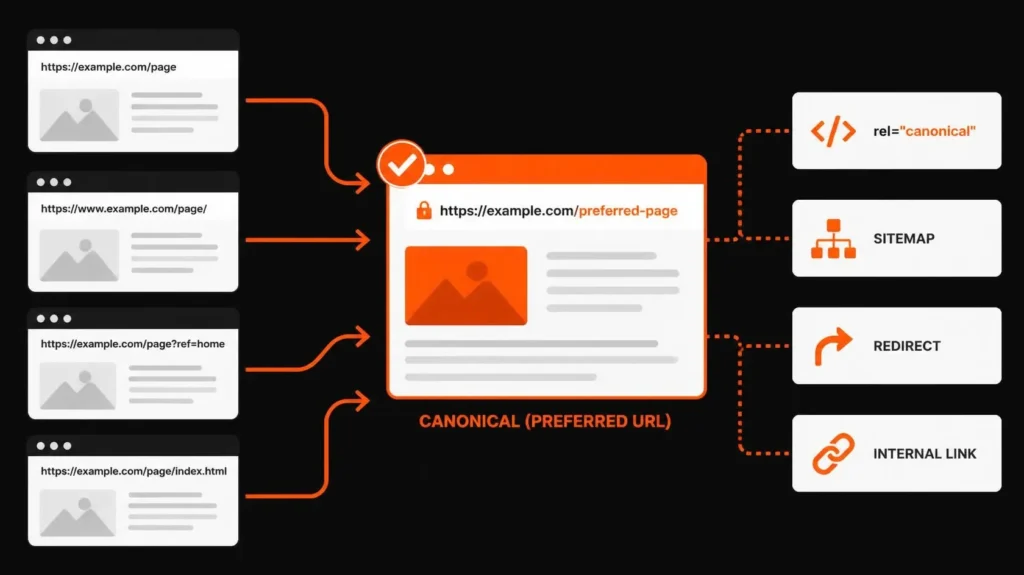
A canonical tag tells search engines which URL you prefer to represent a page when multiple URLs contain the same or very similar content. In technical SEO, the goal is not to force Google to follow your choice. It is to give Google a clear canonical signal and keep other signals, such as redirects, sitemaps and internal links, aligned with that preference. Google treats canonicalization as a process of choosing the representative URL, and a declared canonical remains a hint rather than an absolute rule.
This matters because duplicate URLs are easy to create. Tracking parameters, filters, sorting, alternate URL formats, migrations and CMS behavior can all produce multiple addresses for content that search engines may consider the same or nearly the same.
This guide explains what canonical tags do, when to use them, when a redirect or noindex is more appropriate, how to implement them in WordPress, how to audit them in Google Search Console, and how to troubleshoot cases where Google selects a different canonical.
What Is a Canonical Tag?
A canonical tag is an HTML link element placed in the <head> of a page that identifies the preferred URL for a duplicate or very similar page.
A typical implementation looks like this:
<link rel="canonical" href="https://example.com/preferred-page/" />
The canonical URL is the version you want search engines to treat as the representative version of that content.
Google explains canonicalization as the process of selecting the representative URL from a group of duplicate pages. Google may consider protocol, redirects, sitemap inclusion and rel="canonical" annotations when making that decision.
What Does a Canonical Tag Do?
A canonical tag communicates a preference.
For example, suppose the same article is accessible through:
https://example.com/seo-guide/
https://example.com/seo-guide/?utm_source=email
https://example.com/seo-guide/?ref=homepage
The clean URL can be declared as canonical:
<link rel="canonical" href="https://example.com/seo-guide/" />
This tells Google that the clean URL is the preferred representative.
Canonicalization can also help consolidate signals associated with duplicate URLs. Google specifically notes that canonicalization can consolidate signals such as links toward one preferred URL.
What a Canonical Tag Does Not Do
A canonical tag does not:
- force Google to select the declared URL
- redirect users
- make a duplicate URL disappear
- block crawling
- replace a permanent redirect when a URL has genuinely moved
- function as a substitute for
noindex - fix unrelated or substantially different pages
That distinction is central to good canonical implementation.
How Canonicalization Works
Canonicalization starts when Google discovers several URLs whose primary content appears identical or very similar.
Google can cluster those URLs together and choose a representative version. The chosen page becomes the canonical URL in Google’s systems, although the result does not always match the URL you declared.
Google currently identifies several signals that can influence canonicalization:
- Permanent redirects
rel="canonical"- Sitemap inclusion
- HTTPS preference
- Other site signals, including internal linking and page relationships
Google describes redirects and rel="canonical" as strong signals and sitemap inclusion as a weaker signal. Using multiple consistent methods can strengthen the overall indication.
That leads to a practical rule:
Do not think of the canonical tag as a single isolated instruction. Think of canonicalization as a signal-alignment problem.
If your canonical says one thing, your sitemap says another, and your internal links consistently point to a third URL, you have created unnecessary ambiguity.
When Should You Use a Canonical Tag?
Use a canonical tag when multiple URLs need to remain accessible, but you want one URL to act as the preferred representative.
Tracking Parameters
Tracking parameters are one of the simplest examples.
https://example.com/service/
https://example.com/service/?utm_source=newsletter
https://example.com/service/?campaign=spring
The parameterized versions may still be useful for analytics, but the clean service URL can remain the preferred canonical.
Sorting and Filtering URLs
Ecommerce websites frequently generate URLs such as:
/store/shoes/
and:
/store/shoes/?color=black
/store/shoes/?size=10
/store/shoes/?sort=price-low
The correct treatment depends on whether those filtered pages deserve independent search visibility. A canonical should not be applied automatically to every filter URL simply because it contains parameters.
The real question is:
Does this URL represent a distinct search opportunity with sufficiently different content and purpose, or is it simply another path to substantially the same page?
For larger ecommerce websites, this is where technical SEO, website architecture and content strategy need to work together. A broader Ecommerce SEO strategy can evaluate product variants, category architecture, filters, indexing and duplicate URL patterns together.
Duplicate URL Formats
A site may accidentally allow several variations of the same content through differences such as HTTP versus HTTPS, host variants or trailing-slash patterns.
The best solution is usually to normalize the URL structure and use the canonical consistently.
Google explicitly prefers HTTPS over equivalent HTTP URLs in its canonicalization process, while redirects and canonical annotations can reinforce the preferred version.
Syndicated or Republished Content
Canonicalization can also be relevant when substantially similar content exists on another URL or site and there is a legitimate reason for both versions to remain accessible.
This needs more care than a typical internal duplicate because cross-domain canonicalization still depends on similarity and other signals.
When Should You Use a 301 Redirect Instead?
Use a permanent redirect when the old URL should no longer function as an independent destination.
For example:
https://example.com/old-service/
has permanently moved to:
https://example.com/new-service/
If users should always be sent to the new page, a 301 redirect is generally the appropriate solution.
A canonical tag leaves both URLs accessible. A redirect changes the route itself.
| Situation | Better approach |
|---|---|
| Both URLs need to stay accessible | Canonical |
| Old URL should disappear as a destination | 301 redirect |
| You want to block a page from indexing | noindex |
| You want to control crawling access | Robots.txt, carefully |
| Duplicate page should consolidate to another URL | Canonical or redirect depending on accessibility requirement |
Google’s current documentation specifically recommends redirects when you want to deprecate a duplicate page, while rel="canonical" is used when the alternate page remains accessible.
A common mistake is using a canonical when the real problem is a URL migration. If the old URL has no useful reason to remain available, fix the URL architecture instead of leaving both pages live.
Canonical vs Noindex vs Robots.txt
These mechanisms solve different problems.
Canonical
Use it to identify the preferred representative among duplicate or very similar pages.
Noindex
Use it when a page should not appear in Search.
Google explicitly advises against using noindex as a way to select a canonical within a duplicate set because noindex removes the page from Search rather than simply indicating a preferred version.
Robots.txt
Robots.txt controls crawling access. It is not a canonicalization mechanism.
Google warns against using robots.txt for canonicalization because a blocked URL can still be indexed without its content being crawled and processed normally.
The implementation question should therefore be:
What problem are you actually trying to solve?
Duplicate representation? Use canonicalization.
Permanent URL replacement? Use a redirect.
Search exclusion? Use noindex.
Crawl control? Consider robots directives carefully.
How to Add a Canonical Tag Correctly
Step 1: Decide the preferred URL
Choose the URL that should represent the content.
The target should be the version you actually want users and search engines to associate with that content.
Step 2: Use an absolute URL
A good canonical looks like:
<link rel="canonical" href="https://example.com/page/" />
Google recommends absolute canonical URLs rather than relative paths.
Step 3: Place it in the HTML <head>
The canonical link element belongs in the document head.
<head>
  <link rel="canonical" href="https://example.com/page/" />
</head>
Google’s documentation notes that the rel="canonical" link element is accepted when it appears in the <head>.
Step 4: Make the canonical page self-consistent
For a normal unique page, a self-referencing canonical is a sensible default:
<link rel="canonical" href="https://example.com/about/" />
Google’s current documentation recommends including a self-referencing canonical on the canonical page itself.
Step 5: Align the rest of the signals
The preferred URL should also be reinforced by:
- internal links
- sitemap inclusion
- redirects where appropriate
- consistent HTTPS
- consistent URL formatting
- correct implementation in templates or plugins
Google explicitly recommends linking internally to the canonical URL rather than consistently linking to a duplicate version.
For a wider Technical SEO Service review, canonicalization should be considered alongside crawling, indexing, redirects, XML sitemaps and site architecture rather than treated as an isolated tag.
Canonical Tag Examples
Example 1: Tracking Parameter
Preferred:
https://example.com/seo-guide/
Alternate:
https://example.com/seo-guide/?utm_source=linkedin
Canonical:
<link rel="canonical" href="https://example.com/seo-guide/" />
Example 2: Ecommerce Filter
Suppose these pages show almost the same products:
/store/laptops/
/store/laptops/?brand=dell
/store/laptops/?sort=price
Do not automatically canonicalize all three.
First determine whether the filtered pages are intended to rank independently. If the filtered URL exists only as a navigation state and offers no distinct search value, consolidation may make sense. If it represents a genuine search demand and a useful standalone page, it may need a different strategy.
Example 3: Old URL Migration
Old:
https://example.com/seo-audit/
New:
https://example.com/seo-audit-service/
If the old URL should be retired, use a permanent redirect rather than leaving the old page live with a canonical tag.
Example 4: Self-Referencing Canonical
<link rel="canonical" href="https://example.com/canonical-tags-seo/" />
This is appropriate when the page itself is the preferred version.
10 Common Canonical Tag Mistakes
1. Canonicalizing to a 404 URL
A canonical should point to a valid page, not a broken destination.
2. Canonicalizing to a redirected URL
If the canonical points to an intermediate URL that then redirects, the implementation becomes unnecessarily indirect.
Google’s current guidance recommends using consistent canonical signals and direct preferred destinations.
3. Canonicalizing to a noindex page
The canonical target should actually be the page you want represented in Search.
Do not tell Google:
“Use this page as the canonical.”
while also saying:
“Do not index this page.”
4. Using a relative canonical
Avoid:
<link rel="canonical" href="/seo-guide/" />
Prefer:
<link rel="canonical" href="https://example.com/seo-guide/" />
Google recommends absolute URLs.
5. Pointing every page to the homepage
This is one of the most damaging conceptual errors.
A canonical tag should describe a genuine duplicate relationship. A service page should not suddenly declare the homepage its canonical simply because the homepage is important.
6. Creating conflicting canonical signals
Imagine:
HTML canonical → /page-a/
Sitemap → /page-b/
Internal links → /page-c/
Redirect → /page-d/
That is a poor signal environment.
The goal should be consistency.
7. Adding multiple canonical tags
A page should have one deliberate canonical declaration. Multiple implementations can create ambiguity and may cause search engines to disregard the intended signal.
8. Canonicalizing substantially different pages
Canonicalization is not a way to merge unrelated content.
Two pages need a legitimate duplicate or very similar content relationship. Otherwise, Google may ignore the canonical signal.
9. Using canonical instead of a real redirect
If a page has permanently moved, use the mechanism that actually moves visitors and crawlers.
10. Letting JavaScript change the canonical unexpectedly
Google recommends putting the canonical in the HTML source and ensuring JavaScript does not change it to a conflicting value.
For websites that rely heavily on JavaScript or complex templates, this is a good reason to include source-code validation in a SEO audit.
How to Audit Canonical URLs
A canonical audit should not stop at checking whether a tag exists.
Step 1: Crawl the important URLs
Start by identifying:
- canonical URL
- status code
- indexability
- noindex status
- redirect status
- duplicate clusters
- internal links
- sitemap inclusion
The goal is to identify relationships, not just missing tags.
Step 2: Inspect the source
Open the page source and find:
rel="canonical"
Check the exact URL.
Look for:
- wrong protocol
- wrong domain
- wrong path
- parameter contamination
- accidental staging URLs
- duplicate canonical tags
- template mistakes
For more page-level analysis, an On-Page SEO review can connect canonical checks with title tags, headings, internal linking and page intent.
Step 3: Compare the canonical with internal links
If the page declares:
https://example.com/service-a/
but the website repeatedly links to:
https://example.com/service-a/?source=menu
clean up the internal linking where possible.
Google explicitly recommends linking to the canonical URL rather than a duplicate URL.
Step 4: Check the sitemap
Your sitemap should communicate the preferred URLs rather than a collection of duplicate or obsolete addresses.
Google describes sitemap inclusion as a weaker canonicalization signal, but it still matters as part of the overall signal set.
Step 5: Use Google Search Console URL Inspection
Google Search Console can show both:
User-declared canonical
and
Google-selected canonical
That distinction is extremely useful when troubleshooting. Google notes that its systems may choose a different canonical even when you declare one.
A useful workflow is:
- Inspect the URL.
- Record the user-declared canonical.
- Record the Google-selected canonical.
- Compare the two.
- Review internal links.
- Review sitemap inclusion.
- Review redirects.
- Review content similarity.
- Correct contradictory signals.
- Recheck after Google has had time to recrawl and reprocess the URLs.
Step 6: Recheck after implementation
Canonical changes require recrawling and reprocessing. Do not assume that changing one tag immediately changes Google’s selected canonical.
A Practical Canonical Decision Framework
Use this sequence before changing a canonical tag.
Question 1: Are the URLs the same or very similar in primary content?
No → Do not canonicalize them together.
Yes → Continue.
Question 2: Do both URLs need to remain accessible?
No → Consider a permanent redirect.
Yes → Continue.
Question 3: Which URL should represent the content in Search?
Choose the preferred URL.
Question 4: Does the preferred URL return normally and remain indexable?
No → Fix the target first.
Yes → Continue.
Question 5: Do internal links and sitemap entries reinforce the same URL?
No → Align them.
Yes → Continue.
Question 6: Does Google still choose another canonical?
Yes → Inspect the duplicate cluster, content similarity, redirects, internal links, sitemap and other signals rather than repeatedly changing the tag.
This framework is more reliable than a sitewide rule such as “every parameter URL gets a canonical” because URL intent differs by website.
Canonical Tags for WordPress
WordPress websites often rely on SEO plugins or theme logic to generate canonical tags.
Rank Math, for example, uses the current post or page URL as the default canonical and allows a custom canonical to be specified when needed.
For WordPress sites, the practical checklist is:
- Confirm the correct permalink.
- Open the Rank Math SEO settings for the page.
- Check the Advanced settings.
- Confirm the canonical URL.
- Use a custom canonical only when there is a real reason.
- Confirm the target is the preferred live URL.
- Check the page source after saving.
- Check Search Console when necessary.
A WordPress SEO service can be useful when canonical problems interact with archives, plugins, redirects, sitemap settings, duplicate URLs or page-builder behavior.
Canonical Tags and Ecommerce
Ecommerce sites often need the most careful canonical planning because they naturally generate many URLs.
Potential duplication sources include:
- product variants
- filters
- sorting
- faceted navigation
- category paths
- tracking parameters
- pagination
- internal search URLs
- promotional URLs
Do not ask only:
“Can I canonicalize these pages?”
Ask:
“Which URLs deserve to exist as search landing pages?”
That decision belongs to the wider site architecture.
For example, an online store might have a category page for “running shoes” and a filtered page for “black running shoes”. If the black-running-shoes page represents meaningful demand and has unique value, automatically canonicalizing it to the generic category could remove a potential search asset.
The right answer depends on the actual URL purpose, content, search demand and architecture.
Advanced Canonical Considerations
Canonicalization Does Not Replace Crawl Management
Canonical tags do not magically prevent duplicate URLs from being discovered.
Google may still crawl alternate URLs before determining that they belong to a duplicate cluster. Google explains that duplicate pages can be crawled less frequently after canonicalization, but the process still requires discovery and processing.
For larger sites, canonicalization should therefore sit alongside URL-parameter management, internal linking and sensible architecture.
Canonical and Hreflang Need to Be Coordinated
International sites need additional care.
Google’s current documentation says that when hreflang is used, the canonical should generally be in the same language or the best possible substitute language if an equivalent canonical does not exist.
A common mistake is taking several legitimate regional pages and canonicalizing all of them to one generic language version without considering the search intent those regional pages are meant to serve.
Canonical and Internal Linking Work Together
Suppose your preferred URL is:
https://example.com/service/
but most internal links point to:
https://example.com/service/?tracking=menu
Your site’s internal architecture is reinforcing the wrong URL format.
A canonical is stronger when the surrounding website makes the same choice.
This is one reason SEO content strategy and keyword research can matter even in a technical SEO project. The URL you want to rank should also be the page the site’s information architecture naturally supports.
Canonical Signals Are Not Ranking Guarantees
Canonicalization helps search engines understand URL relationships, but it does not guarantee rankings, indexing or traffic.
Google explicitly says that a canonical preference is a hint and may select another URL.
That is why the correct objective is signal clarity, not a promise that one HTML line will produce a specific ranking outcome.
Canonical Tags and Page Performance
Canonicalization is not a speed optimization technique.
A duplicate URL problem and a slow page problem are different issues, even though they may appear together during a technical audit.
Where performance issues exist, a separate Website Speed Optimization review can address Core Web Vitals, scripts, images, caching and page performance.
Canonicalization During Redesigns and Migrations
Site migrations are a common source of canonical errors.
Before launch, map:
Old URL → New URL
Then check:
- redirect destination
- canonical
- sitemap
- internal links
- hreflang
- structured data
- navigation
- old references
Google’s site-migration guidance recommends updating self-referencing canonicals and internal links on the new site and submitting the new sitemap.
A canonical should never become an afterthought during a migration.
A Canonical Tag Checklist
Before publishing or changing a canonical, check:
URL
- Is this the correct preferred URL?
- Is HTTPS used?
- Is the URL absolute?
- Is the URL clean and stable?
- Is the trailing-slash format consistent?
Target
- Does the canonical target return a normal response?
- Is it indexable?
- Is it the actual preferred page?
- Does it contain substantially the same primary content?
Signals
- Do internal links use the preferred URL?
- Is the preferred URL in the sitemap?
- Do redirects support the same destination?
- Are there conflicting canonical declarations?
Implementation
- Is the canonical in the
<head>? - Is there only one intentional canonical?
- Is JavaScript changing it?
- Is the CMS or SEO plugin generating another value?
Validation
- Has the page been crawled?
- What does URL Inspection show?
- Is the user-declared canonical correct?
- Is the Google-selected canonical different?
Google recommends URL Inspection for understanding the user-declared and Google-selected canonical relationship.
Frequently Asked Questions
What is a canonical URL?
A canonical URL is the representative or preferred URL that search engines select or that you explicitly signal as the preferred version among duplicate or very similar URLs. Canonicalization helps search engines consolidate duplicate URL signals and generally show one representative version in Search.
Should every page have a canonical tag?
A self-referencing canonical is a recommended practice for canonical pages, but canonical tags are not required on every page for Google to function. Google states that sites can generally work without explicitly specifying a canonical, because its systems can select one themselves.
Can Google ignore a canonical tag?
Yes. Google treats a canonical declaration as a hint rather than a rule. If other signals, page similarity or technical conditions point toward another URL, Google can select a different canonical.
What is the difference between a canonical tag and a 301 redirect?
A canonical leaves both URLs accessible and signals which one should represent the content. A 301 redirect sends users and crawlers from one URL to another. Use a redirect when the old URL should be retired, and a canonical when both URLs need to remain accessible.
What is the difference between canonical and noindex?
Canonicalization chooses a preferred representative among similar URLs. noindex tells search engines not to include a page in Search. Google specifically recommends against using noindex as the primary method for choosing a canonical within a duplicate set.
Can a canonical point to another domain?
Cross-domain canonicalization can be used in legitimate situations such as substantially similar syndicated content, but it should not be treated as a universal shortcut. The target needs to genuinely represent the content and other signals still matter.
Why did Google choose a different canonical URL?
Google may choose another canonical because its systems see stronger signals elsewhere. Check content similarity, redirects, sitemap inclusion, internal links, HTTPS, source-code implementation and other URL relationships. Search Console’s URL Inspection tool lets you compare the user-declared canonical with the Google-selected canonical.
Does a canonical tag improve rankings?
A canonical tag is primarily a URL consolidation and indexing signal. It does not directly guarantee better rankings. Its value is helping search engines understand which URL should represent a duplicate or very similar set and consolidate relevant signals when Google accepts that choice.
Can I canonicalize one service page to another service page?
Only when the pages genuinely represent duplicate or very similar content and the other URL is the appropriate representative. Canonical tags should not be used simply because one service page is considered more important.
How do I check my canonical URL?
Inspect the HTML source for the rel="canonical" element, then use Google Search Console’s URL Inspection tool to compare the user-declared canonical with the Google-selected canonical.
A Note From Md Mynul Hassan
Canonicalization is one of those technical SEO areas where a small implementation detail can create a much larger website problem.
My approach is to look at the relationship between the URL, page intent, internal links, sitemap, redirects, indexing and website architecture rather than treating the canonical tag as a standalone checkbox. That is consistent with the wider technical SEO process I use across site audits and implementation work.
You can explore the broader Technical SEO Service, SEO Audit Service, or SEO-friendly web design resources for related technical and architectural considerations.
For readers interested in how technical structure connects with modern AI search, the AI-search-friendly website guide and Google AI Overview source-selection guide provide additional context.
For structured data and entity clarity, see the guide on schema markup for business SEO.
You can also review related practical work in this ecommerce SEO case study, where technical SEO, XML sitemap review, canonical signals, duplicate URLs and website architecture were considered together.
Professional Profiles and Marketplaces
Connect with Md Mynul Hassan through Upwork, Freelancer, LinkedIn, YouTube, and Facebook.
Final Takeaway
A good canonical strategy is not about adding the same tag everywhere.
It is about deciding which URL deserves to represent a piece of content, then making the site’s other technical signals support the same decision.
For simple duplicates, a self-referencing canonical may be enough. For a permanent URL change, a redirect is usually the better tool. For search exclusion, use noindex. For crawl control, use appropriate robots directives. For complex sites, especially ecommerce and large WordPress installations, canonicalization needs to be considered alongside architecture, indexing, internal linking and sitemap management.
The most useful question is not:
“Do I have a canonical tag?”
It is:
“Does my entire website clearly tell search engines which URL should represent this content?”
That is where canonicalization becomes a technical SEO strategy rather than a checkbox.