
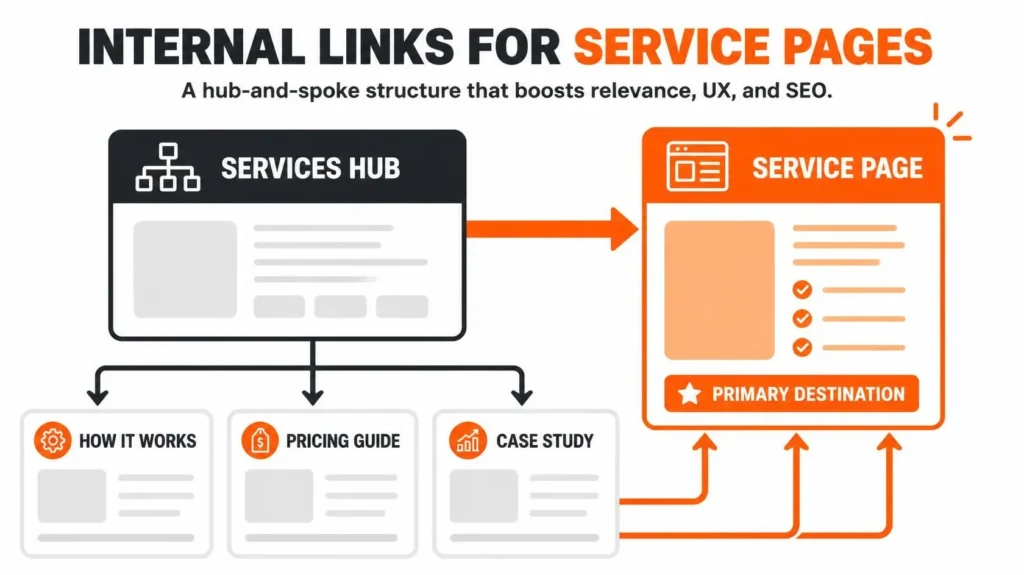
Internal linking for service pages means connecting the important commercial pages on your website to relevant resources, related services, and supporting content through links on your own domain. A well-planned structure helps visitors find the right service and helps search engines discover pages and understand their relationships.
The objective is not to add as many links as possible. It is to make the right pages accessible, explain why they relate to one another, and give readers a useful next step. For a service business, that often means connecting the homepage, services hub, individual service pages, educational articles, and contact or booking pages.
This guide explains how to plan that structure, choose useful anchor text, implement links, find poorly connected pages, and measure whether the changes are helping.
What Is Internal Linking for Service Pages?
Internal linking for service pages is the practice of placing relevant links from pages on your website to the service pages that explain your products or professional offerings.
For example, a roofing company might publish an article about roof leak warning signs. Where appropriate, the article can link to its roof repair service page. The service page can then link to an inspection or maintenance page if that is a relevant next step.
The two pages serve different purposes. The article answers an informational question, while the service page explains the commercial solution. The link connects them without forcing either page to do the other’s job.
Internal links can appear in several places:
Contextual links within paragraphs.
Main navigation and services menus.
Service-category and overview pages.
Breadcrumb navigation.
Relevant related-content sections.
Calls to action that link to an appropriate next step.
Contextual links are particularly useful when readers need additional detail at a specific point in the content. Navigation links serve a different purpose by making important destinations accessible across the website.
Google’s official link best practices explain how crawlable links and descriptive anchor text help Google discover pages and understand their destinations.

Why Internal Links Matter for Service Page SEO
Internal links support several parts of a website’s search and user experience.
1. They help search engines discover important URLs
Search engines use links to find pages and discover additional URLs to crawl. A valuable service page that receives no links from other pages can be harder to discover through ordinary site navigation and contextual paths.
Every important service page should have a clear route from another relevant page. A sitemap can supplement discovery, but it should not be treated as a replacement for useful navigation and contextual links.
2. They explain relationships between pages
A page about keyword research and a page about on-page optimization address related parts of SEO, but they do not have identical purposes. A contextual link can explain when the reader should explore the next topic.
This is why semantic SEO for service pages and internal-link planning work well together. The connection should communicate a real relationship between the two pages, not simply repeat a keyword.
3. They help visitors navigate the buying journey
A visitor reading an educational article may not be ready to request a quote. A relevant service link lets that person investigate the solution when the need arises.
For example, someone learning how search intent affects a web page can move to a service that covers on-page SEO improvements. The link is useful because the destination follows naturally from the question being answered.
4. They connect informational content with commercial pages
A service business can publish helpful educational content while still supporting its commercial goals. The article should answer the question first, then offer a relevant service as the next step.
Good content strategy and SEO content planning identifies which articles support which services, preventing a website from becoming a collection of disconnected posts.
Internal links do not guarantee higher rankings, AI citations, more traffic, or additional leads. Their value comes from improving site connectivity, providing context, and making important resources easier to reach.
Build a Practical Site Architecture for Service Pages
A useful service website structure usually has four connected layers.
1. Homepage and main navigation
Expose the main service categories and priority pages.
2. Services hub and core service pages
Explain the commercial offerings and route visitors to the most relevant service.
3. Supporting articles and detailed resources
Answer specific questions and link to the service that addresses them.
4. Relevant conversion destinations
Help interested visitors reach the contact form, booking page, quote request, or purchase action.
These layers are a planning model, not a rigid hierarchy. A page can link directly to another useful page when that relationship makes sense. The purpose is to provide clear routes, not to force every visitor through a fixed sequence.
Connect pages in both directions where useful
The architecture becomes more effective when connections are not limited to one direction.
A services hub can link to each core service. Supporting articles can link to their most relevant service. Service pages can link back to educational resources that answer common customer questions. Related service pages can connect when customers reasonably compare or use the offerings together.
For example, a service page about technical SEO might link to a guide on crawlability or site architecture. That guide can point back to the technical SEO service. A page about content strategy might link to keyword research when explaining why keyword mapping should precede content production.
The same approach can connect an educational guide to a relevant AEO and GEO consulting service when the discussion turns to content clarity, entity relationships, or answer-focused content. The link belongs there only if it helps the reader.
Which Pages Should Link to a Service Page?
Choose source pages based on their topic, user intent, and the usefulness of the destination.
| Source page | When to link | Example |
|---|---|---|
| Homepage | The service is a core business offering | Homepage links to the main SEO services |
| Services hub | The individual service belongs in that category | Services page links to technical SEO |
| Related blog post | The article naturally leads to the service | A crawlability guide links to technical SEO |
| Another service page | The offerings have a genuine relationship | On-page SEO links to content strategy |
| Case study | The project demonstrates a relevant process or result | A documented SEO project links to the related service |
| FAQ or resource page | The destination answers the reader’s next question | A keyword mapping explanation links to keyword research |
| Breadcrumb or menu | The link improves orientation and navigation | A breadcrumb reveals the service hierarchy |
| Contact or booking path | A visitor has reached a natural decision point | The service page links to the enquiry form |
Do not insert every possible link into every source page. Relevance is more important than uniformity.
Start with the pages most likely to matter
When a website has many URLs, prioritize the pages that have a clear commercial purpose, serve important search intents, or already attract relevant visitors.
A useful first review includes:
Core service pages that are difficult to find from the main navigation.
Relevant articles that receive organic traffic but do not link to an appropriate service.
Related service pages that would help visitors compare or understand an offering.
Important pages with very few incoming contextual links.
Conversion pages that users cannot easily reach from service pages.
You can use keyword research to clarify which queries belong to each page before deciding where the links should lead. If two pages target essentially the same searcher need, solve the page-targeting problem before creating more links between them.
How Many Internal Links Should a Service Page Have?
There is no universal ideal number of internal links for every service page. The appropriate number depends on the page’s length, purpose, navigation needs, related resources, and the number of genuinely useful destinations.
Google’s documentation does not prescribe a magic number. A service page should contain enough links to help visitors navigate and to connect the content with relevant resources, but not so many that the experience becomes confusing.
Use these questions to judge whether a link deserves to remain:
Does it lead to a page that adds useful information?
Would a reader reasonably expect that destination from the anchor text?
Does it help connect an important service to a relevant resource?
Is the same destination already linked nearby in a way that makes another link unnecessary?
Does the link work and point to the intended canonical URL?
Does the link distract from the page’s main task?
A page with four highly relevant contextual links can be better organized than one with twenty forced links. Conversely, a detailed service page may legitimately need more connections because it covers several distinct customer needs.
Treat any link-count target as an editorial planning aid, not a Google ranking rule.
How to Build an Internal-Linking Strategy Step by Step
Step 1: Inventory the important pages
Export your website’s URLs from a crawl, CMS, or existing URL list. Classify the pages into service pages, service categories, supporting articles, case studies, resources, and conversion destinations.
Record each page’s purpose and primary search intent. This prevents an internal-link audit from becoming a list of URLs without context.
An SEO audit can help identify important pages, conflicting targets, broken destinations, and other structural problems that should be addressed before new links are added.
Step 2: Map keywords and intent to the correct destination
Each core page should have a clear role.
A service page generally serves people comparing or seeking a service. An educational article answers a question or explains a process. A case study documents a specific project or outcome where evidence is available.
Map each major query to the page that best meets its intent. If a guide about technical site architecture receives a link to an unrelated local service, the connection may not help the reader.
This step reduces confusion between pages that cover similar concepts and limits the temptation to create many URLs that compete for the same purpose.
Step 3: Identify relevant source pages
For every priority service page, find existing pages that could reasonably direct visitors to it.
Use a simple spreadsheet with these columns:
| Source URL | Destination URL | Proposed anchor | Reason | Status |
|---|---|---|---|---|
| Educational article | Core service page | Descriptive service phrase | Explains the solution | Planned |
| Related service page | Core service page | Relevant service name | Helps compare offerings | Review |
| Main service hub | Core service page | Service category or name | Improves navigation | Existing or planned |
Record the relationship before implementation. This makes it easier to reject links that exist only to increase counts.
Step 4: Add links in the relevant context
Place a link where the reader encounters a concept that naturally leads to the destination.
If an article explains how headings organize information, a link to heading structure and SEO is relevant. If the article explains how metadata supports page targeting, a link to SEO title tag optimization may help.
Do not interrupt a paragraph with an unrelated promotional link. The reader should understand the relationship from the sentence itself.
Step 5: Check the technical implementation
Make sure every important link points to the right destination and works in a browser.
Review:
HTTP status and redirect behavior.
Canonical URL consistency.
Broken links and incorrect destinations.
Crawlable anchor elements with an
hrefattribute.Links that depend on custom JavaScript behavior without a crawlable URL.
Mobile navigation and links hidden behind unusable interface elements.
A broader technical SEO review can help investigate implementation problems that cannot be solved through editorial changes alone.
Step 6: Review page accessibility and conversion paths
A link can be technically valid but still be hard to use. Check that the anchor text is readable, the link is distinguishable from surrounding content, and the destination works on mobile devices.
A service page should also make the next step easy to identify. Depending on the business, that may be requesting a quote, calling the company, arranging a consultation, or making a booking.
Internal-linking changes should support that journey without making an informational page feel like an advertisement. Where this is a problem, conversion rate optimization can help review how the page guides users toward meaningful actions.
Step 7: Measure, review, and refine
Record the initial state before changes. Then monitor whether the important URLs are being discovered, whether the internal-link graph improves, and whether relevant visitors take the next step.
Compare performance over a suitable period and account for other changes, such as content updates, seasonal demand, technical fixes, and external links. Do not attribute every ranking or conversion movement to internal linking alone.
A good strategy is maintained whenever new pages are published, older pages are updated, or services change.
How to Choose Good Anchor Text
Anchor text is the visible wording users click to follow a link. It should clearly describe the destination without sounding unnatural.
| Avoid | Prefer |
|---|---|
| Click here | View the technical SEO service |
| Read more | Learn how to plan supporting content |
| This page | Explore keyword research methods |
| SEO SEO service SEO | On-page SEO improvements |
| A long sentence packed with keywords | A concise phrase that describes the destination |
Descriptive anchor text gives readers useful expectations before they click. Vary the wording naturally when it suits the sentence, but do not obscure what the destination offers.
You do not need to use an exact-match keyword in every internal link. The phrase should describe the linked page in context, rather than exist solely to repeat a target term.
The destination and its surrounding content matter as well. Linking with the words “technical SEO audit” to a general homepage, for example, creates a weaker expectation match than linking to the appropriate technical audit resource.
Practical Example: Internal Linking for a Local Service Business
Consider a hypothetical plumbing company with a homepage, a services hub, drain cleaning and water-heater repair pages, and several educational articles.
The objective is to connect readers with relevant services without making every page link to every service.
| Source page | Destination | Suggested anchor | Why the link makes sense |
|---|---|---|---|
| Services hub | Drain cleaning | drain cleaning service | Helps visitors navigate to the service |
| Article on slow drains | Drain cleaning | professional drain cleaning | Connects a problem to a relevant service |
| Water-heater maintenance guide | Water-heater repair | water-heater repair service | Explains the commercial next step |
| Drain cleaning page | Water-heater repair page | water-heater repair options | Appropriate only if the relationship is useful |
| Relevant service page | Contact page | request a service appointment | Makes the next action accessible |
The main point is the connection between intent and destination. A slow-drain article does not need a water-heater link simply because both services belong to the same business. The link should fit the content and help the reader.
The same framework applies to SEO consulting. An article on keyword mapping can guide readers to a keyword research service, while an article on crawling problems can point toward technical SEO. The architecture follows the business’s actual services and the questions readers ask.
Common Internal-Linking Mistakes
| Mistake | Why it causes problems | Better approach |
|---|---|---|
| Linking to every service from every article | Creates irrelevant choices and clutter | Choose destinations by search intent and context |
| Leaving important service pages isolated | Reduces useful routes to important pages | Add links from relevant hubs, articles, and related resources |
| Using generic anchor text everywhere | Hides the destination’s subject | Use concise descriptive wording |
| Repeating exact-match keywords unnaturally | Makes content awkward and weakens user experience | Write anchors for clarity |
| Linking to redirected or broken URLs | Creates unnecessary navigation and technical friction | Use the correct working destination |
| Treating every orphan page as valuable | Some pages should be consolidated or removed | Review purpose and indexability first |
| Creating multiple pages for nearly identical searches | Risks overlapping intent and duplication | Clarify page ownership before adding links |
| Assuming internal links guarantee rankings | Ignores content quality, competition, and other factors | Track multiple indicators and evaluate cautiously |
| Measuring success by link counts alone | Does not show whether links serve users | Review discovery, relevance, clicks, and conversions |
One additional mistake is assuming that every weak page requires more internal links. The page might target the wrong search intent, contain insufficient useful information, have a technical problem, or need to be consolidated with another page. Diagnose the underlying issue before changing its link structure.
How to Audit and Measure Internal Links
Use a combination of a website crawl, Google Search Console, and business-relevant analytics.
Audit the site’s internal-link structure
A crawler can help you identify:
Pages with no incoming internal links.
Important pages with relatively few internal links.
Broken internal links and unnecessary redirect chains.
Deep or confusing navigation routes.
Pages receiving links from irrelevant sources.
Anchor text that does not describe its destination.
Pages with overlapping subject matter or uncertain intent.
An orphan page is a URL with no incoming internal links within the website graph being analysed. Confirm that the page should exist before adding links. A useful standalone resource may simply need better connections, whereas an obsolete duplicate may require consolidation or a redirect.
Use Google Search Console
Google’s Search Console Links report shows sampled internal and external link information, including the top internally linked pages. It is useful for checking whether important pages receive internal links and which pages link to them. Google also explains that the report is not a complete list of every known link.
Use URL Inspection and the indexing reports to investigate important pages that are not appearing in Google as expected. Then check the Performance report to see whether the target queries and URLs are generating impressions and clicks.
Separate technical indicators from business outcomes
| Metric | What it tells you | Important limitation |
|---|---|---|
| Number of incoming links | How many internal references a page receives in the data source | More links do not automatically mean better results |
| Orphan-page count | Which URLs lack incoming links in the crawl graph | Some excluded or intentionally isolated URLs may not need links |
| Indexed or discovered status | Whether Google knows about the page and its current status | Internal links alone do not guarantee indexing |
| Search impressions and clicks | Whether the page is appearing in search and attracting visits | Many other ranking and demand factors affect performance |
| Organic landing-page sessions | How much organic traffic reaches the page | Traffic quality matters as well as volume |
| Relevant link clicks | Whether visitors use links to explore the intended destination | Clicks do not necessarily result in leads |
| Enquiries, bookings, or sales | Whether the journey is supporting the business objective | Attribution may be affected by other channels and changes |
Establish a baseline before implementation. Note the changes you make, when they go live, and the pages affected. Compare outcomes over time rather than interpreting one day of movement as proof of success.
WordPress Implementation: What to Check
On WordPress, internal links can be managed directly within posts, pages, navigation menus, and reusable templates. SEO plugins can help with related checks, but their recommendations should not replace a review of the actual destination and user intent.
Before publishing a change:
Confirm the target URL and preferred canonical version.
Add the contextual link in the relevant paragraph or navigation area.
Check that the anchor text describes the destination.
Test the link in the desktop and mobile layouts.
Verify that the destination loads correctly and is suitable for indexing.
Review the page after theme, template, or content changes.
For larger websites, document these changes in a spreadsheet or issue tracker. A dedicated WordPress SEO service can be relevant when the audit reveals plugin, template, navigation, or implementation issues beyond editorial linking.
Internal-Linking Checklist
Use this checklist before considering a service page’s internal links complete.
Frequently Asked Questions
Should every blog post link to a service page?
No. A blog post should link to a service page when that service is relevant to the reader’s question or natural next step. An unrelated link may add clutter without helping the reader.
Should service pages link to each other?
Yes, when the services have a genuine relationship. A page about keyword research can refer to on-page optimization when explaining the next stage of SEO. Unrelated services do not need to be connected simply because they belong to the same company.
Do internal links help Google discover pages?
Yes. Google uses links to discover pages and understand relationships between URLs. Important pages should have crawlable incoming links where appropriate, but a link does not guarantee that Google will crawl or index the destination.
How do you find orphan service pages?
Crawl the website, export discovered URLs, and identify pages that have no incoming internal links. Compare those URLs with the sitemap and CMS inventory, then review each page’s purpose. A page may need relevant incoming links, consolidation, redirection, or removal depending on its role.
How can I check which pages rank on Google?
Use Google Search Console’s Performance report to review queries, pages, impressions, clicks, and average position for the selected time range. A rank-tracking tool can complement that data for specific queries and locations. Rankings vary by query, location, device, and time, so no single position should be treated as a permanent ranking.
Do more internal links always improve SEO?
No. Links should have a clear navigational or contextual purpose. Adding more links without considering relevance, readability, technical validity, or the destination’s value may make a page less useful.
How often should internal links be audited?
Review them when publishing new service pages or articles, restructuring navigation, removing content, migrating a site, or identifying search visibility problems. A regular review schedule is useful, but the interval should match how frequently the website changes.
Final Recommendation
Treat internal linking as part of service-page planning, not a task added after all the content is published. Choose the destination first, identify the pages that can naturally support it, add descriptive links, validate the implementation, and measure the outcomes.
For a website with multiple commercial offerings, start with the most important service pages and build outward from relevant articles and service hubs. A focused, well-connected site is more useful than a large collection of pages joined together without a clear purpose.
If the initial review reveals problems with page structure, relevance, or contextual links, the next step is to review the website’s On-Page SEO service. The objective should be a clear, useful website architecture that supports search discovery and helps visitors find the service they actually need.
About the author
Md Mynul Hassan is a Local SEO and search visibility consultant working across SEO, AEO, GEO, on-page optimization, and website content strategy. His website describes work with service businesses, small companies, professional firms, agencies, and selected ecommerce brands.
Explore his SEO and AI search resource hub for related guides.
Connect with Md Mynul Hassan: LinkedIn · YouTube · Facebook · Upwork · Freelancer.com