Your Google Business Profile can be verified, complete, and still fail to appear prominently when people search for your services.
Verification does not guarantee a strong local ranking. Google says local results are primarily influenced by relevance, distance, and prominence. Complete and accurate business information also helps Google understand which searches your profile is relevant to.
The better question is not simply, “How do I optimize my Google Business Profile?”
The better question is: Which part of my local visibility system is preventing the profile from appearing?
This guide explains nine common causes and what to check before making more changes.
Quick answer: Your Google Business Profile may not be ranking because it is not properly verified or eligible, the profile category or information does not match the business, distance is limiting visibility, the profile is not sufficiently relevant to the search, competing businesses have stronger prominence signals, your website does not support the same local and service context, or recent changes have created another underlying problem. Google explains its local ranking system through relevance, distance, and prominence.
For Google’s official explanation, see Google’s guidance on improving local ranking.
Why Your Google Business Profile May Not Be Ranking
Google does not publish a complete formula that tells businesses exactly how each local ranking signal is weighted.
Instead, Google publicly explains three major concepts:
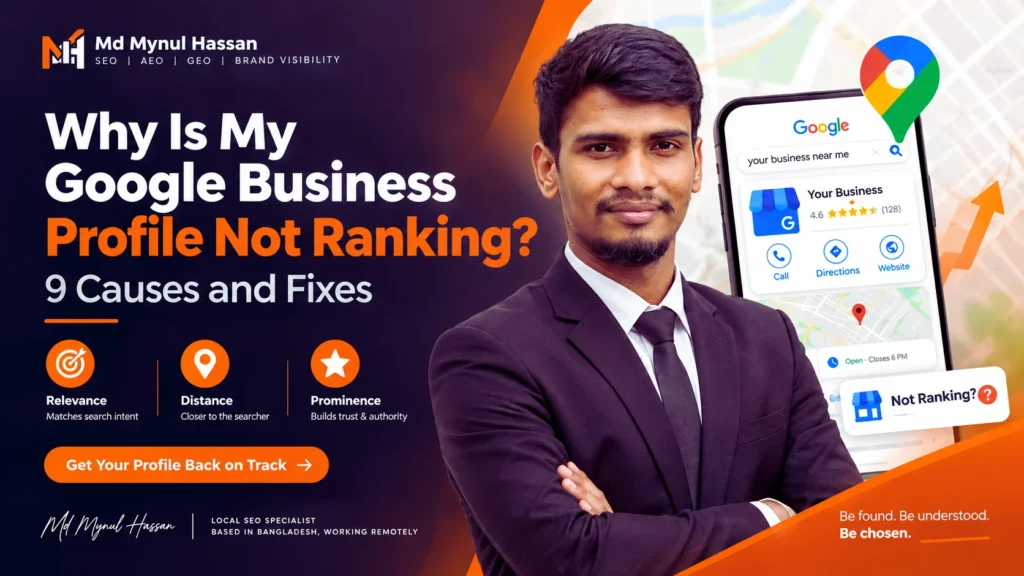
- Relevance: How well your Business Profile matches what someone is searching for.
- Distance: How close the business is to the searcher or the location used in the search.
- Prominence: How well-known or established the business is, based on signals such as reviews and information about the business across the web.
That explains why two businesses with similar profiles can behave differently in Google Search and Google Maps.
A profile can rank well for one service and poorly for another. It can appear near the business address and become less visible several kilometres away. It can also show for a brand-name search while failing to appear for a generic service search.
So before changing your profile, identify which type of problem you are actually dealing with.
9 Reasons Your Google Business Profile Is Not Ranking
1. Your Profile Is Not Verified, Eligible, or Is Restricted
Start with the basics.
If your profile is not properly verified, has a restriction, is suspended, or is a duplicate of another listing, improving categories and services will not solve the underlying problem.
Google requires businesses to meet its eligibility requirements, and verification is part of the process for managing a Business Profile and having business information appear through Google Search and Maps.
Check the following first:
- Is the profile verified?
- Is there a suspension or restriction message?
- Did the business recently change its name, ownership, address, or other major information?
- Is there another profile representing the same business?
- Does the business genuinely qualify for a Business Profile?
A useful diagnostic distinction is simple:
If you cannot find the business even when searching the exact business name: investigate verification, eligibility, suspension, ownership, and duplicate-profile problems first.
If you can find the profile by business name but not by important service searches: investigate relevance, category selection, services, website alignment, reviews, and prominence.
For a broader profile review, see my Google Business Profile Optimization service.
2. Your Primary Category Is Wrong
Your primary category helps Google understand what the business actually is.
Google’s guidance explains that categories help connect businesses with customers searching for relevant products and services, and that category selection can affect local ranking.
The primary category should represent the core business, not simply a keyword you want to rank for.
For example, if a clinic primarily provides dental treatment, choosing an unrelated category because it contains a desirable keyword creates a poor description of the real business.
Review:
- Primary category
- Additional categories
- Services connected to those categories
- Whether the chosen category accurately describes the business
Do not keep changing categories every few days just to test rankings.
Choose the most accurate category based on the real-world business model.
3. Your Business Information Is Incomplete or Inaccurate
Google recommends complete and accurate business information because it helps the system understand and match businesses with relevant searches.
Check the core profile information carefully:
- Business name
- Primary category
- Additional categories
- Address
- Service area
- Opening hours
- Phone number
- Website
- Services
Completeness does not mean filling every field with marketing language.
Accuracy is more important.
Your business name should reflect the name actually used by the business. Adding service keywords, city names, or promotional phrases to the official business name can create policy problems.
For example:
Bad: Best Emergency Plumber Austin 24/7 Cheap Plumbing
Better: Use the genuine business name as it is represented in the real world.
Google’s guidelines for representing your business provide the official rules for how business information should be represented.
4. Distance Is Working Against You
This is one of the most misunderstood local SEO problems.
Google says distance is one of the main factors used in local results. That means your Google Business Profile does not have one fixed ranking position across an entire city.
A business may appear prominently close to its location and become much less visible farther away.
For example, imagine a dental practice located in central Manchester.
A searcher a few streets away may see the practice near the top of the local results. A searcher in another part of the city may see a completely different group of businesses.
That does not automatically mean the Business Profile is broken.
It may simply reflect the geographic component of local search.
For service-area businesses, the service area should also reflect the places the business genuinely serves. Do not add cities simply because they have high search volume.
The geographic area should make sense for the real operation of the business.
5. Your Profile Does Not Clearly Match the Service Search
This is a common situation:
“My business ranks when I search for its name, but it does not rank when I search for my service.”
That tells you something important.
The profile is discoverable as a business entity, but it may not be competitive enough for the specific service query.
Review the relationship between:
Primary category → services → website → location → search intent
Suppose an HVAC company wants visibility for emergency AC repair.
The Business Profile should clearly represent the actual business and its relevant services. The website should also contain useful information about those services and the locations genuinely served.
This does not mean repeating the same keyword in every field.
It means making the business easier to understand.
For broader local search planning, see my Local SEO service.
For understanding which searches deserve dedicated pages, my Keyword Research service focuses on search intent, page targeting, and content opportunities.
6. Your Prominence and Review Signals Are Weaker Than Competitors
Relevance and distance are only part of the local search picture.
Google also discusses prominence, which is connected to how well-known a business is.
Reviews, references from other websites, and broader public information can contribute to how established a business appears.
That does not mean there is a simple formula such as:
“Get 100 reviews and you will rank.”
There is no official Google rule that works that way.
Think comparatively instead.
Imagine two businesses targeting the same service in the same area.
One has:
- A well-established online presence
- More genuine customer reviews
- Relevant third-party mentions
- A stronger website
- Clearer service information
The second business may have a complete profile but much less overall prominence.
That is why local SEO should not become a race to fill out one profile field after another.
Reputation develops through the broader business presence.
7. Your Website and Local Signals Do Not Support the Profile
Your Google Business Profile and website should make sense as parts of the same business entity.
Check the relationship between:
- Business name
- Services
- Location
- Contact information
- Website content
- Internal links
- Local context
For example, imagine a plumbing company has a Business Profile that clearly identifies it as a local plumbing company, but the website has very little information about plumbing services, weak service-page structure, unclear location information, and poor internal linking.
The profile and website are not providing a strong, coherent picture.
This does not mean you need dozens of location pages.
It means your important business facts and services should be clear and consistent.
My On-Page SEO service can help improve how important service pages communicate their topic, intent, and relevance.
For technical issues affecting crawling, indexation, site architecture, canonicals, internal links, and structured data, see my Technical SEO service.
For content structure and supporting articles, see my Content Strategy and SEO Content Writing service.
8. Spammy or Manipulative Changes Are Creating Problems
Trying too hard to force local relevance can create problems.
Common examples include:
- Adding keywords to the official business name
- Creating locations where the business does not genuinely operate
- Creating duplicate profiles for individual services
- Using misleading business information
- Adding service areas that do not reflect the real operation
The profile should describe the actual business.
A useful rule is:
Every important Business Profile field should describe something that is genuinely true about the business.
This is usually easier to maintain and much safer than trying to manipulate individual fields for rankings.
9. You’re Measuring the Wrong Search or Expecting Immediate Changes
Local ranking is not one universal number.
One searcher can see a different local result from another searcher because location matters.
So this is weak evidence:
“I searched once and my business was not number one.”
A better measurement process checks several types of searches.
Brand Search
Search the exact business name and location.
This helps establish whether the profile is discoverable as the business itself.
Core Service Search
Search the main service without adding excessive modifiers.
Service + Location
Check important searches that combine the service with the relevant city, suburb, town, or market.
Maps Search
Compare behavior in Google Maps with Google Search.
Performance Data
Do not rely only on manual ranking checks. Use Business Profile performance data and business outcomes where available.
Google provides metrics such as searches, views, calls, website clicks, and directions for eligible profiles.
A new profile also should not be judged immediately. Google notes that new businesses can take time to appear in search results, and changes to business information may also take time to propagate.
A 15-Minute Google Business Profile Ranking Diagnosis
Before changing your profile, follow this order.
Step 1: Search for the Exact Business Name
Search the real business name and location.
If the profile is completely absent, investigate eligibility, verification, ownership, suspension, and duplicate issues.
Step 2: Check the Primary Category
Ask whether the primary category accurately represents the core business.
Step 3: Check Services
Review the services listed in the profile and compare them with the services the business actually provides.
Step 4: Check Location and Service Area
Confirm that the address, service area, and business model are correctly represented.
Step 5: Compare the Actual Search Intent
Search for the main service together with the target location.
Look at the businesses that repeatedly appear.
Do not only count their reviews. Study what type of business they are, which categories they use, what services they highlight, how their websites are structured, and how clearly they address the searcher’s need.
Step 6: Review Your Reputation
Look at genuine review quantity, review recency, overall customer feedback, and the wider public presence of the business.
Step 7: Check the Website
Confirm that the website clearly communicates:
- What the business does
- Which services it provides
- Where it operates
- Who it serves
- How customers can contact it
Step 8: Check Technical SEO
Important service and location pages should be crawlable, indexable, internally linked, and connected to the website’s broader architecture.
My SEO Audit service is designed around this type of diagnosis rather than simply exporting a list of automated warnings.
Step 9: Record the Baseline
Before making major changes, record:
- Current Business Profile information
- Main categories
- Important services
- Current review count
- Current performance metrics
- Important target searches
- Website pages supporting those services
This creates a baseline that allows you to understand what changed later.
Screenshot Walkthrough: What to Capture Before You Change the Profile
For a professional article or case study, use real screenshots rather than invented examples.
Screenshot 1: Exact Business Name Search
Capture a Google Search result using the business name and location.
Purpose: Show whether the profile is publicly discoverable.
Screenshot 2: Business Category
Capture the category section inside the Business Profile.
Purpose: Document the primary and additional categories before optimization.
Screenshot 3: Location or Service Area
Capture the location settings relevant to the business model.
Purpose: Show whether the geographic setup matches the real operation.
Screenshot 4: Business Profile Performance
Capture available performance data such as searches, views, calls, website clicks, and directions.
Purpose: Establish measurable baseline data.
Make sure all private customer or business information that should not be public is removed before publishing screenshots.
Common Google Business Profile Ranking Mistakes
Keyword-Stuffing the Business Name
Do not turn the business name field into a list of services, cities, offers, or keywords.
Creating Locations That Aren’t Real
Serving customers in a city does not automatically mean that you have a physical office there.
Publishing Fake or Manipulative Reviews
Build your review profile through genuine customer feedback. Never treat reviews as a numbers game where the method of acquiring them does not matter.
Creating Separate Profiles for Every Service
A business generally should not create separate profiles simply because it offers multiple services.
Use the appropriate profile and represent the services accurately within it.
Changing Everything at Once
If you change the category, business name, services, location information, website, review process, and other profile elements at the same time, it becomes difficult to understand what caused a later change.
Obsessing Over One Manual Ranking Check
Local results vary by searcher location and search context. One manual check is not a complete measurement system.
How to Measure Whether Your Fixes Are Working
A useful measurement framework connects visibility with actual business outcomes.
Search visibility → profile views → calls or website visits → enquiries → qualified customers
Google Business Profile performance can provide useful activity data such as searches, profile views, calls, website clicks, and directions.
But the most important metric depends on the business.
For a plumber, calls may matter most.
For a clinic, appointment requests may matter more.
For a restaurant, direction requests and calls may be more meaningful.
For a professional service, website enquiries and consultation requests may be the important outcome.
That is why local SEO reporting should connect search visibility with business actions rather than focusing only on rankings.
The Bigger Local SEO Picture
Your Google Business Profile matters, but it should not be treated as an isolated SEO asset.
A stronger local search system connects several layers:
Accurate Business Profile
↓
Relevant categories and services
↓
Correct geographic information
↓
Genuine reputation
↓
Relevant website content
↓
Internal linking
↓
Local authority and business references
↓
Measurement and improvement
This is why Local SEO is broader than editing a Business Profile once.
Your profile, website, service pages, location context, technical foundation, reviews, and business reputation should make sense together.
For website-level improvements, see my WordPress SEO service.
For agencies that need behind-the-scenes delivery support, see my White Label Local SEO service.
What This Looks Like in a Real Local SEO Strategy
A Google Business Profile problem is often easier to understand when you look at the entire search journey.
For example, an HVAC company may not need another generic blog post saying that HVAC SEO is important.
It may need:
- A more accurate primary category
- Clearer service information
- Stronger AC repair and installation pages
- Better location relevance
- Improved internal linking
- Stronger website-to-profile consistency
- A genuine review acquisition process
- Better conversion paths
That type of connected strategy is reflected in my HVAC Local SEO case study, where the work was structured around Local SEO, Google Business Profile optimization, website improvements, content, internal linking, and conversion considerations.
For professional services, my immigration law firm Local SEO case study shows another example of treating local search visibility as a connected system rather than a single profile optimization task.
Frequently Asked Questions
Why is my Google Business Profile not ranking even though it is verified?
Verification confirms that the profile has gone through Google’s verification process, but it does not guarantee a strong local ranking. Local visibility can still be affected by relevance, distance, prominence, category selection, business information, website support, competition, and other factors.
Does the primary category affect Google Business Profile ranking?
Yes. Google states that category selection affects local ranking and recommends choosing the category that most accurately represents the core business.
Why does my business rank for its name but not its services?
That usually indicates that the profile is discoverable as a business but is not competitive enough for the specific service query. Review the primary category, services, website relevance, geographic context, reputation, and broader prominence signals.
Does distance affect Google Maps ranking?
Yes. Google identifies distance as one of the primary local-ranking factors. A business can therefore perform differently depending on where the search is conducted.
Do Google reviews help local ranking?
Reviews can contribute to a business’s broader prominence and reputation. However, there is no official review-count formula that guarantees a particular Maps position. Focus on genuine customer feedback rather than chasing a specific number.
How long does a new Google Business Profile take to appear?
New profiles and significant profile changes may take time to appear consistently in search. Avoid judging the result immediately after making changes. Establish a baseline and monitor the relevant performance data over time.
Can schema markup make my Google Business Profile rank higher?
Schema markup does not provide a guaranteed ranking boost. Structured data can help search engines understand the entities and relationships represented on a webpage, but it should accurately describe the visible content and business information.
Why does my profile rank in one part of the city but not another?
Distance is an important reason. Local rankings can vary according to the searcher’s location, which means a business can be visible in one geographic area and less visible elsewhere.
Should I create a new Google Business Profile if my current profile isn’t ranking?
Not automatically. First determine whether the existing profile has a verification, suspension, duplicate, category, relevance, geographic, or prominence problem. Creating another profile can make the situation more complicated when the underlying issue is still unresolved.
Connect With Md Mynul Hassan
For Google Business Profile optimization, Local SEO, technical SEO, SEO strategy, AEO, and GEO-focused search visibility, you can learn more about my work through my website and professional profiles.
Visit my SEO website to explore services, case studies, articles, and contact options.
You can also find me on Upwork, Freelancer.com, LinkedIn, YouTube, and Facebook.
Conclusion
When your Google Business Profile is not ranking, more editing is not always the answer.
Start with diagnosis.
Check eligibility and verification first. Then review the primary category, business information, geographic setup, service relevance, prominence, website support, potential policy problems, and measurement data.
The most useful principle is simple:
Don’t optimize your Google Business Profile blindly. Find the signal, mismatch, or limitation that is actually affecting visibility.
Google’s own local-search framework gives you the starting point: relevance, distance, and prominence.
Once those are understood, the next step is to connect the Business Profile with the wider Local SEO system instead of treating the profile as a standalone ranking trick.
That means accurate business information, relevant services, useful website pages, genuine reputation signals, strong local context, logical internal linking, and measurement tied to real business outcomes.