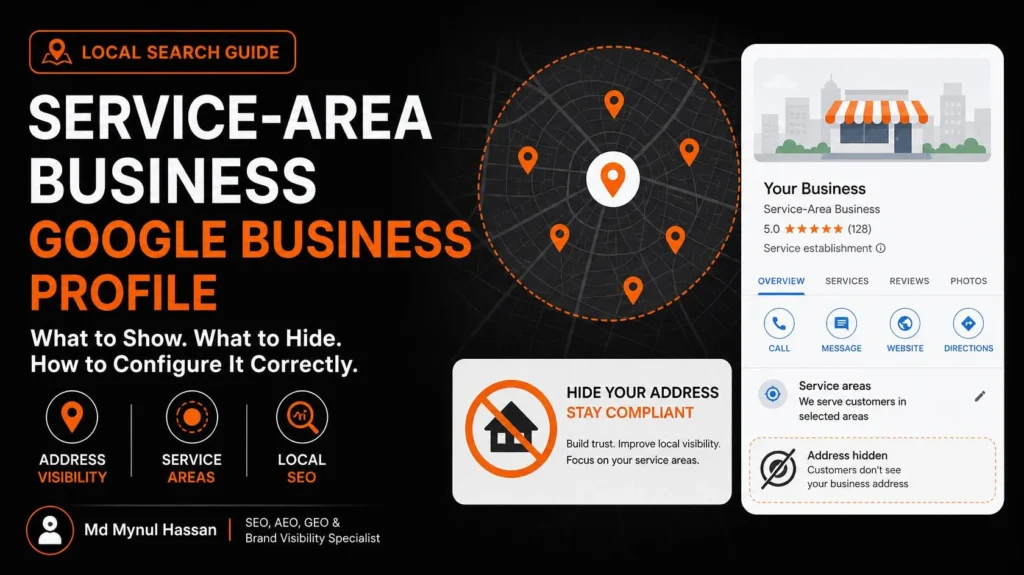
If your business travels to customers instead of serving them at a public storefront, your Google Business Profile should reflect that operating model. In most cases, a service-area business should hide its street address when customers do not visit that location and should specify the geographic areas it genuinely serves.
Correct setup starts with business eligibility, address visibility, and realistic service coverage. Categories, services, reviews, website information, and local search strategy then help customers understand what the business offers. This guide explains how to configure the profile, avoid common mistakes, and measure whether the setup supports useful enquiries.
What Is a Service-Area Business on Google?
A service-area business (SAB) is a business that visits customers or delivers to them rather than serving them at its business address. Examples include plumbers who repair pipes in customers’ homes, mobile mechanics, cleaning companies, electricians, landscaping contractors, and some moving services.
Google Business Profile supports eligible service-area businesses, even when they do not have a conventional customer-facing storefront. The important distinction is how the business actually operates, not which profile type appears more attractive in Google Maps.
For example, a plumber may manage scheduling and administration from a home office but perform all repair work at customers’ properties. If customers do not visit the home for business services, the profile should represent the company as a service-area business and hide that residential address.
A company with a real, staffed customer-facing workshop that also sends technicians to customers may qualify as a hybrid business. It can represent its qualifying premises and its service area.
For the official eligibility and representation rules, read Google’s Business Profile guidelines.
Should a Service-Area Business Show Its Address?
Usually, no. If customers are not served at your business address, remove that address from the public Google Business Profile and configure your service areas instead. If customers genuinely visit a qualifying business location, the appropriate setup may be a storefront or hybrid profile. The decision must follow the actual business model.
| Business type | Should the public profile display an address? | Service area |
|---|---|---|
| Home-based plumber who visits customers | Hide the residential address | Specify the areas actually served |
| Mobile cleaning company without a customer-facing office | Hide the address if customers do not visit it | Specify genuine coverage |
| Repair workshop that receives customers and sends technicians to them | May show the qualifying workshop address | Can specify the service area too |
| Customer-facing shop with permanent signage and staffed premises | Show the eligible location | Add a service area if the business also travels or delivers |
| Online-only consultant with no qualifying in-person customer contact | Generally not eligible for a Business Profile solely because it serves a geographic market | An online service area does not create eligibility |
Google’s rules require businesses to represent their real-world operations accurately. A virtual office or mailing address does not automatically become a qualifying storefront simply because it gives a business a city address.
Can you use your home address?
A home can be the operating base of an eligible service-area business. The issue is whether customers are served at that address.
If you work from home and travel to customers, you generally should remove the residential address from public view. This can protect your privacy while keeping your eligible business represented on Google.
If customers genuinely visit your home-based business, do not assume that you can display the address automatically. The location must meet the relevant Business Profile requirements, including the conditions for a customer-facing business. Check the current official guidelines before making the address public.
Service-area business vs. hybrid business
A service-area business serves customers at their locations. A hybrid business serves customers at its own qualifying location and also travels to or delivers to customers.
The difference determines whether the public street address belongs on the profile. Selecting a profile type should be based on real operations, not a belief that one configuration will rank better.
How to Set Up a Service-Area Business Google Business Profile
Follow these steps in order. If you already have a profile, review its current configuration before making changes.
Step 1: Confirm that the business is eligible
Start with the actual business. Confirm that it provides an eligible service, has a real operating base, and interacts with customers in a way Google permits.
Check whether customers visit your location, whether your staff travel to them, and whether your business has more than one genuine staffed location. These details determine the correct configuration.
Do not create a new profile merely to reach another city. If an existing profile has an incorrect address or business type, investigate the existing listing first.
Step 2: Open the profile’s location settings
Sign in to the Google account managing the business profile. Open the profile management interface, choose the option to edit the profile, and locate the business location settings.
Google may change the exact interface labels, so follow the options currently displayed in your account.
Review the following information before saving anything:
- The real business address used for verification and administration.
- Whether customers are served at that address.
- The current address visibility setting.
- The existing service areas.
- Any inaccurate or outdated location details.
Keep a record of the original settings so that you can identify what changed and investigate issues if they arise.
Step 3: Set the correct address visibility
If customers do not visit your business location, remove the public-facing address as directed by Google. Do not replace it with a coworking space, mailbox, virtual office, or another location where the business does not genuinely operate.
If the business qualifies as a hybrid business, make sure the address shown represents a real customer-facing location that meets Google’s requirements.
This step is more important than trying to include every possible location phrase in your profile description. An accurate profile is the foundation; geographic targeting cannot compensate for a misleading business representation.
Step 4: Add the service areas you genuinely cover
Google allows eligible service-area businesses to specify up to 20 service areas. These can be based on cities, postal codes, or other supported geographic areas.
To edit them, open your Business Profile, select Edit profile, go to Location, and find Service area. Choose appropriate suggested areas or enter the areas you serve, then save your changes.
Two restrictions matter:
- Google does not let you define a new service area simply as a radius around the business. Specify actual supported areas instead.
- Google’s general guidance says the overall service area should usually stay within about two hours of driving time from the business base, although some larger areas may be appropriate.
See Google’s official instructions for managing service areas.
Do not feel compelled to use all 20 entries. Five accurate areas that reflect your genuine operations can be more useful than a list of locations where you rarely or never work.
Google states that approved service-area edits may take up to 48 hours to appear. Avoid repeatedly changing the settings just because an update does not appear immediately.
Step 5: Review categories, services, and business details
Choose the primary business category that most accurately describes what the business is. Add other relevant categories only when they genuinely represent its operations.
For example, a plumbing company should not add unrelated categories simply because those terms appear in competitor profiles.
Review the available service fields and describe the actual services offered. Keep the business name accurate, telephone number current, business hours correct, and website destination relevant to the company.
Your description should help customers understand the business rather than act as a list of keywords. My guide to writing a useful Google Business Profile description covers that separate task in more detail.
Step 6: Complete verification or resolve existing profile issues
Follow the verification method Google offers for your business. Depending on the business and account, the available process can vary.
Provide genuine business information and any evidence requested through the official workflow. Make sure the details are consistent with the business’s actual operations.
If an existing profile is suspended or restricted, do not create another listing to bypass the problem. Identify the possible policy issue, correct inaccurate information, prepare the requested evidence, and follow the applicable appeal process.
For a more detailed troubleshooting path, see what to do when a home-services Google Business Profile is suspended.
Step 7: Align the profile with your website
The profile and website should communicate the same underlying business identity.
Check that the website uses the correct business name, provides working contact information, explains the services clearly, and describes the geographic coverage accurately.
Your location strategy should follow what the business actually does. A profile that lists one set of service areas while the website claims nationwide coverage can create confusion for customers and weaken trust.
This is where Local SEO services support GBP setup. Local SEO connects the profile with useful service content, geographic relevance, website structure, and customer discovery rather than treating the profile as a standalone asset.
How to Choose the Right Service Areas
The best service-area list reflects operational reality. It should not be built around a goal of appearing in the largest possible number of cities.
Use this practical three-part framework when deciding which locations to include.
1. Core coverage
These are the cities, towns, or postal areas where the business regularly provides its services. Work availability, travel time, customer demand, and the business’s actual operating capacity should support their inclusion.
2. Secondary coverage
These are nearby locations that the company genuinely serves but may visit less frequently. Include them only when the business can fulfil work there and the coverage makes sense operationally.
3. Areas that need review
These are distant or marginal locations that appear attractive for marketing but have little connection with the business’s current operations.
Before including one, ask:
- Do we actually accept and fulfil work there?
- Can we travel there within a reasonable operational window?
- Can we serve customers reliably in that area?
- Does the business have a valid reason to claim that coverage?
- Would we confidently tell a customer that we serve that location?
If the answers are unclear, investigate first.
This framework is a practical planning method, not a Google ranking formula.
Should every service area have its own website page?
No. Create a separate location page only when the business has useful, distinctive information to provide about that service in that location.
A genuine location page might explain the specific services offered, relevant local operating information, realistic availability, and how customers in that area can request service.
Avoid producing dozens of nearly identical pages with only the city name changed. Geographic repetition does not establish that a business operates meaningfully in each location.
Use keyword research to understand local search demand, and use on-page SEO to keep any legitimate supporting pages relevant and useful.
How to Optimize a Service-Area Business Beyond the Address Setting
Correct address visibility is essential, but it is only one part of the profile and website’s wider local search presence.
Keep the business information consistent
Use an accurate business name, phone number, hours, website, services, and business description. Update them when the business changes.
Review important directory listings and other business references for outdated phone numbers, old addresses, or inconsistent names. Fix inaccurate records rather than submitting the business indiscriminately to every directory.
Use relevant photos and service information
Where applicable, use genuine images of the team, vehicles, equipment, work, and services. Only publish images that accurately represent the business.
Service descriptions should clarify what customers can hire you to do. A homeowner looking for a boiler repair should not have to interpret vague claims about general home improvement.
Build a responsible review process
Ask genuine customers for honest reviews without offering rewards that violate the platform’s policies or attempting to manufacture positive feedback.
Respond professionally to feedback and use recurring comments to identify service or communication problems. Reviews can help customers make decisions and contribute to the prominence component of Google’s local ranking framework.
Connect profile optimization with broader search work
A useful implementation often involves several related activities:
- A technical SEO review to check crawlability, indexability, redirects, canonical settings, and website structure.
- An SEO audit to prioritize problems instead of making random changes.
- A content strategy for service pages and supporting local information.
- A relevant WordPress SEO review if the website uses WordPress and has implementation or indexing issues.
For businesses that also want to improve how clearly they answer local customer questions, the principles in AEO for local businesses can help connect direct answers with accurate business information.
These activities support one another, but none should be presented as a guaranteed route to a specific Google Maps position.
How Local Rankings Work for Service-Area Businesses
Google identifies relevance, distance, and prominence as the main factors in local ranking.
Relevance concerns how closely the business profile matches the search. Distance concerns the relationship between the searcher and the relevant businesses. Prominence relates to how well-known a business is and can involve information such as reviews and links from other websites.
This means that selecting a city as a service area does not guarantee a top position for every search made in that city.
A business can accurately serve several towns yet appear in different positions depending on the service searched for, the searcher’s location, competing businesses, and other factors.
For example: An electrician may genuinely serve a central town and three nearby communities. The profile should reflect those actual service areas. The company can then improve its website, service descriptions, reputation, and relevant local information. It should not create fake offices or claim that the same ranking will appear throughout all four locations.
How do you measure progress?
Review profile performance and website data over time, looking beyond a single ranking screenshot.
Useful indicators include:
- Profile views and search exposure where reported.
- Website clicks from the profile.
- Calls and other profile interactions where available.
- Qualified enquiries, bookings, and completed work.
- Relevant organic search impressions and clicks.
- Leads and revenue attributable to local discovery, where reliable attribution is available.
Separate visibility from outcomes. More profile activity does not always mean more qualified customers.
Use Google Business Profile Optimization as the central service resource if you need a coordinated review of profile accuracy, business information, website alignment, and local search opportunities.
Common Service-Area Business Setup Mistakes
Showing a home address when customers are not served there
Problem: The profile exposes a residential address even though the business travels to customers.
Better approach: Remove the public-facing address as required and specify genuine service areas.
Adding every possible nearby city
Problem: The profile suggests geographic coverage that the business cannot reliably support.
Better approach: Prioritize realistic core and secondary areas instead of filling every available service-area field.
Using a virtual office to target a city
Problem: The business claims a location where it does not legitimately operate.
Better approach: Represent the actual business location and operating model. A virtual address alone does not establish eligibility.
Creating multiple profiles for one business
Problem: Duplicate listings are created to target separate cities despite there being only one qualifying business location.
Better approach: Maintain one profile for a service-area business serving its broader coverage area. Additional profiles should be considered only when the business genuinely has qualifying separate locations with distinct operations under Google’s rules.
Changing the address and service area repeatedly
Problem: The owner keeps editing settings without confirming the actual cause of an issue.
Better approach: Record the existing setup, make accurate changes, allow time for approved edits to appear, and investigate any continuing problem before making further changes.
Creating thin city pages
Problem: The website publishes many repetitive pages that provide little useful information.
Better approach: Develop only the location pages that serve a genuine customer need and explain a meaningful local offering.
Judging the entire campaign by rankings alone
Problem: The owner treats a change in one keyword position as proof of success or failure.
Better approach: Evaluate visibility, website engagement, qualified enquiries, conversion quality, and operational outcomes together.
A Practical Google Business Profile Setup Checklist
Before completing the setup, review every item that applies to your business.
- Confirm that the business qualifies for a Google Business Profile.
- Identify whether it is a service-area, hybrid, or storefront business.
- Determine whether customers are genuinely served at the business address.
- Hide the public address when required.
- Select only genuine service areas supported by the business’s operations.
- Check that the business name and categories accurately represent the business.
- Review contact details, hours, website, services, and description.
- Complete the appropriate verification process or resolve existing profile issues.
- Check that the website and important business references are consistent.
- Publish useful service or location pages where they genuinely help customers.
- Establish a review process based on genuine customer experiences.
- Record a performance baseline before evaluating changes.
- Track qualified enquiries as well as profile activity.
- Schedule periodic reviews when business coverage, staffing, services, or contact details change.
Conclusion: Represent the Business Accurately First
A well-configured service-area business Google Business Profile begins with an accurate representation of the company. Show a qualifying customer-facing address when appropriate, hide it when customers are not served there, and describe the service area the business genuinely covers.
After setup, align the profile with the website, keep the business information current, support customers with useful service details, and measure the enquiries that matter to the business.
If your profile has address, service-area, or local visibility problems, start by identifying the underlying issue rather than making random edits. My Google Business Profile Optimization service and contact page provide the next step for businesses that need a structured review.
Connect with Md Mynul Hassan
I share SEO, Local SEO, Google Business Profile, AEO, and GEO resources through my professional and social profiles. You can also review my freelance profiles to learn more about my services.
Md Mynul Hassan is an SEO, AEO, GEO and Brand Visibility Specialist based in Bangladesh, working remotely with businesses across international markets.