
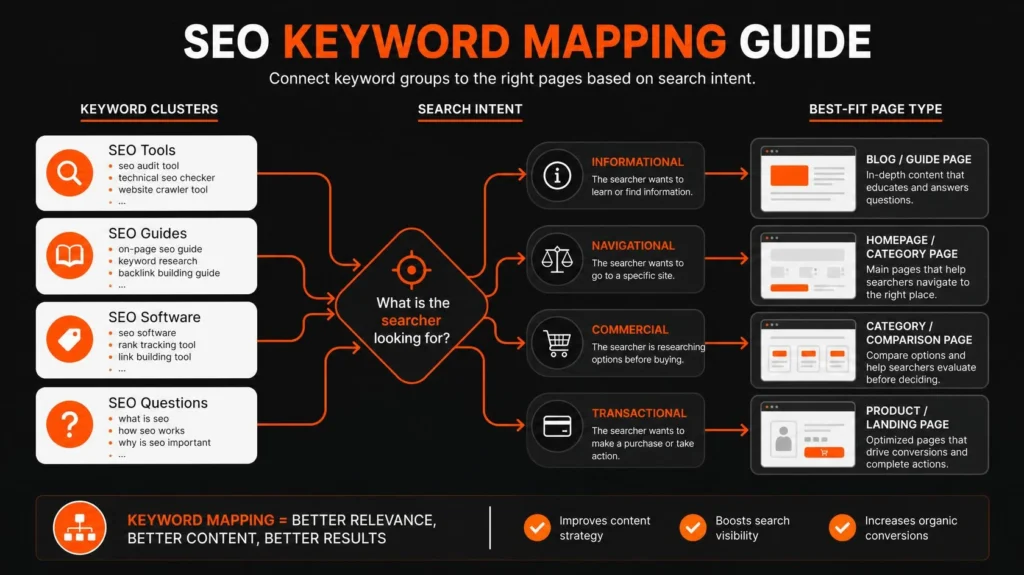
Keyword mapping is the process of grouping related search queries and assigning each group to the website page that best satisfies its search intent. A useful keyword map identifies the main keyword for each page, supporting keyword themes, the target URL, the page’s purpose, and the action needed to improve or create it.
The goal is to make it clear which page should answer each important search need. You can use keyword mapping to plan new content, improve existing pages, reduce overlapping page targets, and connect blog articles with relevant services or products.
This guide explains how to map keywords to pages, decide when a new URL is justified, build a practical spreadsheet, identify possible keyword cannibalization, and measure what happens after implementation.
What Is Keyword Mapping in SEO?
Keyword mapping is the process of connecting keyword groups to specific website URLs according to topic, search intent, page purpose, and business relevance.
For example, an accounting firm might assign searches for accounting services to its service page, searches about bookkeeping costs to an explanatory guide, and searches about a specific bookkeeping service to a dedicated service page if that page serves a distinct need.
A keyword map usually records:
Primary keyword: The main search topic assigned to a page.
Secondary keywords: Related searches the same page can satisfy naturally.
Target URL: The existing or proposed page responsible for that topic.
Search intent: What the searcher wants to accomplish.
Page type: Such as a service page, product category, product detail page, or educational article.
Action: Whether to optimize, create, differentiate, merge, redirect, or investigate.
A keyword map is a planning document, not a ranking guarantee. It gives your SEO work a clear structure and helps prevent keyword research from becoming a list of disconnected phrases.
Why Does Keyword Mapping Matter?
Keyword research tells you what people search for. Keyword mapping turns that information into decisions about your website.
Without a map, a business might publish several articles about the same customer problem while leaving an important service page poorly targeted. A content team might also create a page for every variation returned by a keyword tool, even when one well-organized page could address those searches.
Keyword mapping helps you identify four important opportunities.
Give each page a clear purpose. A service page should explain a service and help a potential customer evaluate it. An educational article should explain a question or process. The content format should fit the search need.
Make better content decisions. Before commissioning a new article, check whether an existing page already answers the question. Updating an appropriate page may be more useful than creating another URL.
Connect informational and commercial content. An article about a customer problem can link to a relevant service page when that service is a logical next step.
Prioritize the right work. Search volume alone should not decide which page deserves investment. Relevance, intent, business value, competition, page quality, and implementation effort also matter.
For businesses planning new content, a structured keyword research service can connect search demand with intent, competing pages, and the actual URLs a website needs.
Keyword Mapping vs. Keyword Clustering vs. Keyword Research
These processes support one another, but each solves a different problem.
| Process | Main question | Main output |
|---|---|---|
| Keyword research | What are people searching for? | A researched list of relevant queries |
| Keyword clustering | Which queries belong together? | Groups of related keywords |
| Keyword mapping | Which page should serve each group? | A keyword-to-URL plan |
| Content planning | What must each page cover? | Page briefs and content priorities |
| SEO implementation | What should change on the website? | Updated pages, new content, links, and technical actions |
Suppose an online store researches hundreds of searches related to running shoes. Clustering groups them by product category, brand, use case, and informational intent. Mapping then assigns those groups to suitable category pages, product pages, or guides.
The important distinction is that a cluster does not automatically require a new URL. Mapping determines whether an existing page can meet that cluster’s needs or whether a separate destination is justified.
How to Map Keywords to Pages: A Step-by-Step Process
A reliable workflow begins with the website you have, not the number of articles you want to publish.
Step 1: Build a verified URL inventory
Collect the important URLs on your website before assigning keywords. Include existing service pages, product and category pages, educational articles, landing pages, and other resources that matter to the business.
A sitemap is useful for discovering URLs, but check the actual pages before adding them to your map. Depending on the website, you may also need a crawl, CMS export, or manual review.
Record the current URL, page title, H1, page type, indexability, canonical destination, and primary purpose. Add existing target keywords or Search Console data where available.
Look for:
Two pages that appear to serve the same purpose.
Important pages that lack a clear target topic.
Old URLs or pages that redirect elsewhere.
Pages that are difficult to discover through internal navigation.
Existing content that should be improved before anything new is published.
A relevant SEO audit can help identify targeting conflicts, weak pages, broken links, and technical issues that affect implementation.
Why this matters: Without a current URL inventory, you cannot reliably tell whether a topic needs a new page or whether an existing page should be improved.
Step 2: Group keywords by search intent
Start by understanding what each searcher wants to accomplish.
Common intent categories include:
Informational: The person wants to learn or solve a problem.
Commercial investigation: The person is evaluating potential products or providers.
Transactional: The person is ready to take an action, such as buying or requesting a service.
Navigational: The person is looking for a specific website, brand, or destination.
Local: The person is seeking a service or business associated with a geographic area.
These categories are a starting point, not a substitute for checking the actual search results.
Consider the phrases “what is keyword mapping” and “keyword mapping service.” They share the same central topic, but the first asks for an explanation while the second suggests commercial investigation. The appropriate page formats and calls to action may therefore differ.
A blog guide can explain how mapping works. A service page can explain the research, planning, deliverables, and implementation support available to a client.
The distinction should be reflected in your SEO content strategy, so every article has a clear purpose in the wider website.
Step 3: Compare search results and existing pages
Keyword wording alone is not enough to determine page ownership. Compare the search results for closely related queries and look at the type of content Google returns.
Ask four questions:
Do the queries express the same underlying need?
Do their organic results feature similar pages and formats?
Could one well-structured page satisfy both searches without becoming unfocused?
Would the searcher reasonably expect a different page for either query?
For example, searches for “keyword mapping template” and “SEO keyword mapping spreadsheet” may be served by the same guide if the guide provides a useful spreadsheet structure. The wording differs, but the practical need may be nearly identical.
By contrast, “keyword mapping service” and “how to map keywords to pages” may deserve separate destinations because their buying stage and expected content differ.
Use SERP overlap as evidence, not as an inflexible mathematical rule. Similar results can support combining topics, while different results can indicate separate intents. Neither outcome is automatic.
Step 4: Assign one primary keyword and relevant supporting themes
Choose a primary keyword that describes the page’s main purpose. Then add related terms that the page can satisfy naturally.
The primary keyword is a planning label. It does not need to appear in every heading or paragraph.
For an educational page about keyword mapping, the primary topic could be “keyword mapping.” Supporting themes might include assigning keywords to pages, mapping existing URLs, grouping keywords by intent, keyword maps, and page ownership.
For each supporting term, decide whether it:
Belongs in the main explanation.
Deserves a subsection.
Should be answered briefly in an FAQ.
Has a distinct enough search intent to become another page.
Is irrelevant to the page and should remain outside the cluster.
This process helps make on-page SEO optimization more purposeful because the title, headings, content, and links reflect one coherent topic.
Step 5: Record a clear action for every page
A keyword map should not stop at assigning keywords. It should tell the team what to do next.
Use a consistent set of action labels:
| Action | When to use it |
|---|---|
| Optimize | A suitable page exists but needs improved targeting, content, or structure. |
| Create | No suitable page exists and the search intent justifies a new destination. |
| Differentiate | Two pages have legitimate but insufficiently distinct roles that need clarification. |
| Merge | Similar pages serve substantially the same purpose and would be better consolidated. |
| Redirect | A page is being retired or consolidated and a relevant replacement exists. |
| Investigate | Available evidence is insufficient to make a confident decision. |
| Monitor | The page is appropriate and needs observation rather than an immediate change. |
Do not merge pages or change URLs simply because a tool flags keyword overlap. First verify the purpose of each page, its existing value, the results it attracts, and the consequences of changing it.
Step 6: Prioritize work by impact and effort
Once the map is ready, identify which actions should happen first.
Consider the business value of the topic, search relevance, present page quality, existing impressions and clicks, conversion potential, technical limitations, and the amount of work required.
A service page attracting relevant impressions but weak clicks might need a clearer title and stronger content alignment. An important page that cannot be indexed needs technical investigation before a major content expansion.
A useful prioritization framework is:
Priority = Business relevance + Search opportunity + Page need, evaluated against implementation effort and risk.
This is a decision framework, not a validated numerical formula. If your team uses a scoring system, document the scoring rules and apply them consistently instead of treating a tool’s opportunity score as an objective measure of business value.
When Should a Keyword Get a New URL?
Create a new URL when the keyword cluster represents a distinct search need that an existing page cannot adequately satisfy without compromising its main purpose.
A new keyword or slight wording variation, by itself, is not enough.
| Situation | Recommended action | Reason |
|---|---|---|
| Several phrases have the same intent and need the same explanation | Use one page | The searches can be satisfied together |
| An existing page covers the topic but misses important questions | Improve the page | The main purpose already fits |
| A product category and a specific product meet different needs | Consider separate category and product pages | Users need different information |
| A service page and an educational guide serve different stages of the buying journey | Keep separate and connect them | Their purposes differ |
| Two old articles answer essentially the same question | Review for consolidation | Separate pages may create unnecessary duplication |
| The proposed page merely swaps a keyword or city name into existing copy | Do not create it without further justification | It may offer little distinct value |
| The data is inconclusive | Investigate first | A permanent URL decision needs stronger evidence |
Before creating a URL, check whether the proposed page has a distinct primary intent, a useful body of content, a legitimate place in the website architecture, and a clear relationship with existing pages.
For service-area pages, verify that the business actually serves the area and can provide useful, specific information. A list of locations is not a sufficient reason to create dozens of similar pages.
Website architecture should support the strategy from the beginning. This is one reason SEO-friendly web design and keyword mapping are closely related.
A Practical Keyword Mapping Example
The following is an illustrative example for a fictional bookkeeping business. It is not a client case study or a claim about actual ranking results.
| Keyword or cluster | Search intent | Target page | Action |
|---|---|---|---|
| Bookkeeping services | Commercial | /bookkeeping-services/ | Optimize the service page |
| Monthly bookkeeping pricing | Commercial investigation | /bookkeeping-pricing/ | Create if there is sufficient distinct value |
| What does a bookkeeper do? | Informational | /blog/what-does-a-bookkeeper-do/ | Create an educational guide |
| Online bookkeeping services | Commercial | Existing online bookkeeping page, if suitable | Review and optimize |
| How to organize receipts for bookkeeping | Informational | Relevant existing guide or a new article | Check existing content before deciding |
| Bookkeeping services for restaurants | Industry-specific commercial | Dedicated industry page if justified | Investigate audience and service differentiation |
This example illustrates three principles.
First, a commercial service and an educational guide can cover related topics without needing to target identical intent.
Second, an additional service or industry page requires a meaningful distinction. It should explain a real offering or audience need, not merely repeat existing copy.
Third, the action field is as important as the keyword field. A map becomes useful when it translates research into an implementation decision.
What if multiple existing pages rank for the same query?
Do not automatically redirect one of them. Investigate whether they genuinely answer the same need or whether one serves a secondary query.
For example, a service page and a blog guide may both receive impressions for a broad term. That overlap does not necessarily mean either page is defective. Compare their query sets, intent, clicks, conversions, content, and role in the website.
The right response could be to improve page differentiation, change internal links, clarify titles and headings, consolidate redundant content, or leave both pages as they are.
How to Build a Keyword Mapping Spreadsheet
A spreadsheet is often sufficient for a small or medium-sized website. Larger websites may need a more structured database or workflow integrated with their CMS and crawling tools.
Start with these columns:
| Column | What to record |
|---|---|
| URL | Existing or proposed destination |
| Page type | Service, article, product, category, or other format |
| Primary keyword | Main search topic |
| Secondary keywords | Closely related supporting searches |
| Search intent | What the searcher wants |
| Funnel stage | Awareness, consideration, or conversion |
| Existing content status | Published, outdated, missing, or under review |
| Search volume and KD | Tool-reported estimates, including tool and date |
| Search Console evidence | Relevant queries, impressions, clicks, CTR, and position when available |
| Internal link targets | Pages this page should link to or receive links from |
| Action | Optimize, create, differentiate, merge, redirect, investigate, or monitor |
| Priority | Business need, potential, effort, and risk |
| Owner and status | Responsible person, implementation status, and review date |
Keep the original keyword data in a separate tab if you need to preserve every variant. The page mapping tab should remain readable enough for a writer, SEO specialist, developer, and business owner to use.
Use a unique row or record for each target URL. If one page has several keyword variants, store those in the supporting-keywords field rather than creating duplicate page assignments.
After implementation, update the record. A completed content change that is never reviewed can leave the map out of date.
How to Avoid Keyword Cannibalization
Keyword cannibalization is a useful diagnostic concept for cases in which multiple pages appear to compete for the same search need. It should not be treated as a diagnosis based only on shared words.
A website may naturally have several pages that mention the same central term. The important question is whether the pages have clear, useful purposes and whether the observed overlap is creating a real problem.
How to investigate possible cannibalization
1. Find the overlapping query. Use Google Search Console to identify a query for which more than one URL appears.
2. Compare the pages. Check whether the pages answer the same question, use similar formats, target the same audience, or have different commercial purposes.
3. Review performance over time. Determine whether the URLs alternate, whether one has a clearly different query profile, or whether their performance is stable. A single date range may not tell the entire story.
4. Choose the correct response. Improve differentiation if the pages serve different purposes. Consolidate genuinely redundant pages where justified. Redirect an old page when there is an appropriate replacement. Leave pages alone if overlap is natural and there is no meaningful problem.
5. Recheck the implementation. Review the destination URLs, internal links, canonical tags, redirects, and updated content. Do not assume a canonical tag alone solves a content-planning problem.
A broader technical SEO review can help when page conflicts involve redirects, canonicalization, crawlability, or indexation.
Avoid reflexively adding more keywords to every affected page. Sometimes the better decision is to simplify the website, improve the page hierarchy, or consolidate redundant content.
How Keyword Mapping Supports Website Architecture and Internal Linking
A keyword map helps explain how the pages on your website should relate to one another.
A typical service website might connect its main service pages with explanatory articles, comparison guides, case studies, and conversion destinations. An ecommerce site might connect category pages with subcategories, product details, buying guides, and related products.
These relationships should follow genuine relevance and the reader’s next need.
For example, a guide about choosing bookkeeping software could link to a relevant comparison resource. A service page could link to a useful explanatory guide. A content strategy page could link to a keyword research page if a reader needs help with research and planning.
The link text should accurately describe the destination. Google’s link best practices explain why crawlable links and descriptive anchor text help Google discover pages and understand their destinations.
For implementation examples, see the existing guide on internal linking for service pages. For a broader look at topic relationships, the guide to semantic SEO for service pages discusses how pages can communicate relationships between topics and entities.
The purpose is not to make every page link to every other page. Link only where the destination adds something useful, and keep the anchor text natural.
How to Measure Whether Keyword Mapping Is Working
Keyword mapping is a planning process, so evaluation should examine both implementation and subsequent performance.
Start by recording which pages were changed, which were created or consolidated, the date of implementation, and the reason for the change.
Google Search Console provides reporting for search impressions, clicks, click-through rate, and average position. You can use its query and page dimensions to investigate which searches show a page and which URLs receive search traffic. See the official Search Console performance report guidance.
Use a small set of relevant measures:
Query-to-page alignment: Are relevant queries appearing for the intended URLs?
Impressions: Are the mapped pages appearing for relevant searches?
Clicks and CTR: Are searchers clicking through when the page appears?
Average position: How does reported visibility change over comparable periods?
Indexation and technical status: Can important pages be discovered and indexed as intended?
Conversions: Are qualified visitors taking actions that matter to the business?
Content coverage: Are important search needs still unaddressed?
Do not judge the strategy from one metric alone. Higher impressions may reflect wider exposure without more qualified visitors. A position change may coincide with technical updates, seasonality, competition, or other content changes. A rise or fall after mapping does not, by itself, prove that the mapping change caused it.
For ecommerce businesses, the value of the map may also be reflected in better-organized categories and product pages. A suitable ecommerce SEO service can address the broader relationship between category structure, product targeting, content, and technical implementation.
Review the map whenever important pages are added, removed, consolidated, or significantly updated. A quarterly review is a reasonable starting point for many sites, with more frequent reviews for sites undergoing active releases or major changes. Adjust the cadence to actual business needs rather than treating a fixed interval as a ranking rule.
Common Keyword Mapping Mistakes
Creating a new URL for every keyword variation. Different wording does not automatically indicate distinct intent. Review the result types, page purpose, and user need first.
Choosing targets based only on volume. A high-volume query may be too broad, commercially irrelevant, or poorly matched to the business. Evaluate value and intent alongside search demand.
Ignoring existing content. A new page may duplicate a topic already covered. Inventory existing pages before approving new content.
Assigning too many primary topics to one page. Closely related searches can belong together, but unrelated goals can make the content unfocused. Keep one clear central purpose.
Assuming every overlap is cannibalization. Two pages can mention a shared keyword while serving different purposes. Diagnose the actual problem before consolidating content.
Using generic internal-link anchors. Descriptive anchor text helps readers understand where a link leads. Use the destination’s subject naturally rather than repeating a keyword without context.
Failing to update the map. When URLs or services change, update the records, link plan, and action status.
Making changes without measuring them. Record what changed and review relevant performance data over an appropriate period. Avoid claiming causation from a simple before-and-after comparison.
Keyword Mapping Checklist
Before you publish or implement your map, confirm that:
Frequently Asked Questions About Keyword Mapping
What is keyword mapping in SEO?
Keyword mapping is the process of assigning groups of related keywords to appropriate website pages. It connects a page’s primary topic, supporting searches, search intent, and target URL so the website has a clear content plan.
How many keywords should one page target?
There is no universal ideal number. A page can target several related keyword variations when they share the same search intent and can be answered naturally within the same content. The page should retain one clear primary purpose.
Can multiple pages target the same keyword?
Yes, pages can share relevant words, and that overlap is not automatically a problem. Investigate whether they serve the same search need, compete for the same results, or have distinct informational and commercial roles before making changes.
What is the difference between keyword mapping and keyword clustering?
Keyword clustering groups related queries by topic or intent. Keyword mapping assigns those groups to the most appropriate existing or planned pages. Clustering organizes the terms, while mapping determines where they belong.
How often should you update a keyword map?
Update it when you publish, remove, merge, or significantly revise pages, or when business priorities and search intent change. A quarterly review is a practical starting point for many websites, but the right frequency depends on how often the site changes.
Does keyword mapping guarantee higher Google rankings?
No. Mapping clarifies page targeting and helps organize SEO work, but it cannot guarantee rankings, traffic, featured snippets, or AI citations. Outcomes also depend on content usefulness, competition, technical accessibility, authority, and other factors.
Apply Keyword Mapping to Your Website
A useful keyword map makes the next action clear. It shows which existing pages should be improved, which topics deserve new URLs, where overlapping content needs investigation, and how the pages should connect.
Start with your existing URLs and priority search needs, then assign keywords based on intent instead of treating every phrase as a separate content opportunity.
When the research needs to be carried through to page planning, competitor analysis, and implementation, my Keyword Research Service provides a relevant starting point for discussing your website and business priorities.
Connect with Md Mynul Hassan
Professional profiles and marketplaces
For more SEO content and professional updates, connect with me on LinkedIn, watch my videos on YouTube, or follow my Facebook page.
For project enquiries and freelance collaboration, you can also find me on Upwork and Freelancer.com.