
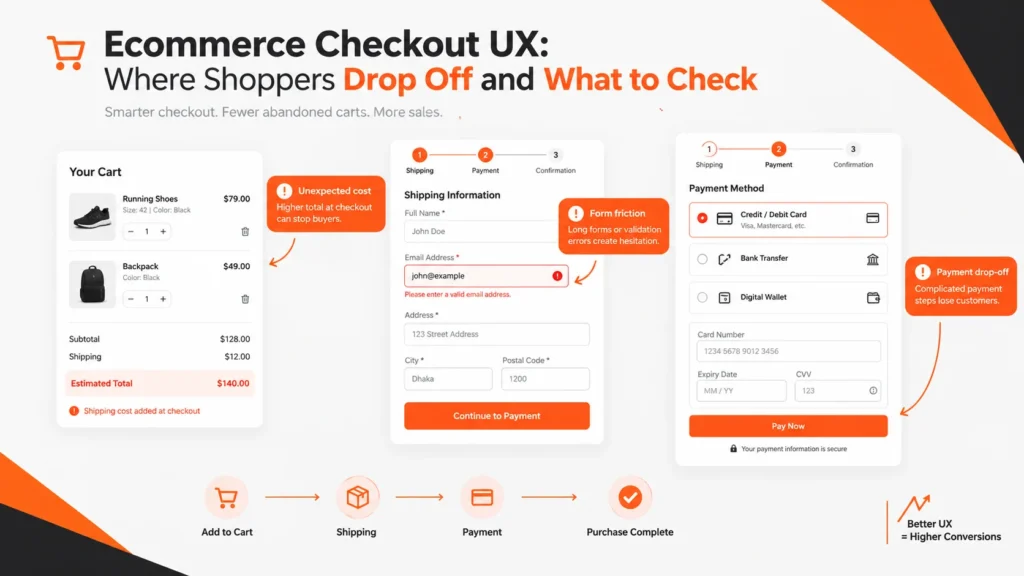
Ecommerce checkout UX is the design and usability of the steps between adding a product to the cart and completing payment. A good checkout makes necessary information easy to provide, keeps costs understandable, handles errors clearly, and helps shoppers finish the purchase without avoidable effort.
A store can have strong products, good search visibility, and qualified visitors and still lose buyers at checkout. The problem may be an unexpected delivery charge, forced account creation, unnecessary fields, unclear errors, limited payment methods, weak mobile usability, or a technical payment problem.
Baymard’s current research places average ecommerce cart abandonment at about 70%, but that number should not be treated as your store’s target or used by itself to diagnose a checkout. Some shoppers are comparing products, checking prices, saving items for later, or deciding not to buy. The more useful question is: where do shoppers who intended to continue stop, and what caused that interruption?
This guide explains how to find the drop-off point, identify the likely friction, decide what to fix first, and measure what changed.
What Is Ecommerce Checkout UX?
Ecommerce checkout UX is the user experience of reviewing an order, providing the information needed to fulfill it, selecting shipping and payment options, and completing the purchase.
Checkout UX includes more than a payment form. Depending on the store, the experience can involve the cart summary, guest or account selection, contact details, shipping address, delivery method, billing details, payment method, coupon handling, order review, error messages, policies, and confirmation.
That makes checkout a shared system involving user experience, ecommerce functionality, payment technology, fulfillment, accessibility, performance, trust, and conversion optimization.
Your ecommerce website design service should therefore consider checkout as part of the entire shopping journey rather than as a separate screen.
Why Do Shoppers Drop Off During Checkout?
Checkout abandonment has multiple causes. Strong optimization begins by separating fixable experience problems from legitimate purchase hesitation.
| Friction category | What the shopper experiences | What to inspect |
|---|---|---|
| Unexpected costs | The final price is higher than expected. | Shipping, taxes, fees, duties, discounts and total-cost visibility. |
| Account friction | The shopper feels registration is mandatory. | Guest checkout visibility and account prompts. |
| Form friction | The checkout asks for too much information. | Field count, field relevance, autofill and address entry. |
| Error friction | The shopper cannot understand how to fix a problem. | Validation, error wording and preserved data. |
| Payment friction | The preferred method is missing or fails. | Payment options, declines, redirects and recovery. |
| Trust friction | The shopper hesitates before giving sensitive information. | Returns, privacy, support, security communication and business identity. |
Current Baymard research highlights unexpected costs, account creation, checkout complexity, payment methods, validation and other usability issues as recurring checkout concerns.
The practical lesson is simple: a high abandonment rate tells you that a problem may exist; it does not tell you what the problem is.
How to Find Where Your Checkout Is Losing Shoppers
Do not redesign your entire checkout because one dashboard shows a large abandonment percentage. First locate the stage where users are being lost.
Step 1: Map the actual checkout journey
Write every meaningful step in the transaction.
- Cart review
- Checkout start
- Customer information
- Shipping address
- Delivery method
- Payment selection
- Payment authorization
- Order confirmation
Your store may use fewer or more stages. The goal is measurement, not a particular number of screens.
Step 2: Segment the funnel
Compare mobile and desktop behavior. Then look at new versus returning shoppers, major traffic sources, important countries or regions, and payment methods where the data is available.
A drop that occurs almost entirely on mobile suggests a different investigation from a payment decline affecting every device.
Step 3: Separate abandonment from failure
A shopper who leaves after seeing a high shipping cost may have a pricing objection. A shopper who enters all payment details, receives an unclear error, and leaves has encountered a different problem.
Analytics can identify the stage. Session recordings, form analytics, customer support messages, usability testing, and payment logs can provide clues about the cause.
Step 4: Reproduce the experience
Test the checkout yourself on current mobile and desktop devices. Try a new customer path, a returning customer path, different addresses, a discount code, and each meaningful payment method.
Approach this like an SEO audit and diagnostic review: prioritize meaningful problems instead of treating every warning as equally important.
8 Ecommerce Checkout UX Areas to Check First
1. Price, Shipping, Taxes and Fees Are Clear
Shoppers should understand the likely total cost before they reach the final purchase decision.
Baymard and Shopify both identify unexpected costs as an important checkout issue. Shopify’s current guidance specifically recommends making costs visible earlier in the shopping journey when possible.
A useful order summary can show:
- Product subtotal
- Shipping or delivery cost
- Taxes where applicable
- Discounts
- Required fees
- Final total
If shipping depends on the delivery address, tell shoppers when that calculation happens. Do not let the first appearance of an unavoidable charge occur immediately before payment unless the business model genuinely makes earlier disclosure impossible.
2. Guest Checkout Is Easy to Find
Yes, guest checkout should usually be easy to find when an account is not operationally required.
Current Baymard research treats account selection and guest checkout as a distinct usability area. Shopify’s current checkout guidance also recommends reducing registration friction.
A shopper should be able to understand the available paths quickly:
- Continue as guest
- Sign in
- Create an account
Account creation can be offered after purchase when the business does not need an account before the order.
3. Checkout Forms Ask Only for Necessary Information
Every checkout field should earn its place.
There is no universal ideal number of fields because fulfillment requirements differ. An international retailer, subscription business, B2B supplier and digital-product store will need different information.
Review every field with this question:
Why does the business need this information before the customer can complete the order?
Potential sources of unnecessary work include duplicate address information, optional company fields presented as required, separate inputs that can be combined appropriately, and other data requests that do not contribute to fulfillment or the legitimate business process.
Baymard’s current research contains a dedicated field and form study, while Shopify’s 2026 guidance also emphasizes reducing form complexity.
For a WooCommerce store, form changes may require both UX and implementation decisions. Your WordPress SEO service is relevant when ecommerce functionality and WordPress implementation overlap.
4. Labels and Error Messages Help Users Recover
A checkout form needs to explain both what information is required and what to do when something goes wrong.
Use clear field labels, distinguish required and optional information, select appropriate input types, and provide understandable errors.
For example, “Invalid input” gives the shopper almost nothing to work with. “Enter a valid postal code for the selected country” points toward a solution.
Good error handling also preserves information already entered. Making a customer retype an entire address because one field failed turns a small problem into a much larger one.
5. Payment Options Match Customer Needs
Payment UX should provide relevant choice without creating unnecessary complexity.
Current Baymard research identifies payment-method usability as a major checkout topic. Shopify and BigCommerce likewise emphasize relevant payment options and streamlined payment experiences.
Depending on the market, the checkout may need some combination of:
- Credit and debit cards
- Digital wallets
- Relevant local payment methods
- Installment or financing options where appropriate
More choices are not automatically better. Payment methods should be understandable and organized so shoppers can quickly recognize the option they prefer.
Test failure states as well as successful payments. A payment method that works in testing but produces vague decline messages can become a major conversion barrier.
6. The Order Summary Is Easy to Review
Before payment, shoppers should be able to confirm what they are buying, how much it costs, and what delivery choice they selected.
A useful order summary can include the product name, quantity, variant, item price, discounts, shipping, taxes where relevant, and total.
It should also be possible to correct mistakes without restarting checkout.
This is one place where checkout design connects directly to the wider ecommerce SEO strategy. Product information, pricing, category architecture, and the shopping journey should tell a consistent story from discovery through purchase.
7. Mobile Checkout Works as a Mobile Experience
Mobile checkout should be tested as an interaction environment, not treated as a desktop page squeezed into a smaller screen.
Mobile shoppers use virtual keyboards, smaller screens and touch controls. A form that feels acceptable on desktop may become difficult when the keyboard covers part of the screen or a user has to enter a long address manually.
Check:
- Browser and device autofill
- Appropriate keyboard types
- Tap target size
- Field spacing
- Payment redirection and return behavior
- Error focus and recovery
- Visibility of the order total
- Sticky controls that may cover content
- Slow connection behavior
If performance contributes to the problem, review the site’s website speed optimization work alongside the UX findings. Ecommerce stores have additional performance concerns because carts, payment systems, analytics, apps and dynamic elements may be necessary.
8. Trust and Policy Information Appears When It Matters
Trust information is most useful when it answers the customer’s immediate concern.
Before payment, a shopper may want to know:
- Who the business is
- When the order will arrive
- What happens if the product is returned
- How support can be reached
- What the payment process involves
- Which policy applies to the purchase
Keep relevant information near the decision that creates the concern. Avoid fake security badges, invented certifications, artificial reviews, or unsupported guarantees.
One-Page vs Multi-Step Checkout: Which Is Better?
Neither format is universally better.
One-page checkout keeps more information visible and can reduce movement between pages. Multi-step checkout can make a complex transaction easier to understand by separating the work into logical stages.
Current industry guidance continues to discuss both structures rather than establishing a universal rule. Baymard’s research explicitly treats one-step and multi-step checkout as different interaction models, while current Shopify and BigCommerce guidance emphasizes reducing unnecessary effort rather than treating page count as the only design variable.
| Factor | One-page checkout | Multi-step checkout |
|---|---|---|
| Short purchases | Can be efficient | May add unnecessary movement |
| Complex purchases | Can become visually dense | Can organize complexity |
| Mobile | Less page switching but potentially more scrolling | Less visible complexity but more navigation |
| Progress | Often less explicit | Can make progress obvious |
| Many fields | Can feel intimidating | Can distribute information across stages |
| Decision rule | Choose the structure that makes the purchase easiest to understand and complete for your customers. | |
Do not choose the architecture because another ecommerce brand uses it. Choose it based on the purchase complexity and your own customer behavior.
A Practical Checkout Friction Priority Matrix
Suppose your checkout has ten possible improvements. You need a way to decide which ones deserve attention first.
Use four questions:
- Frequency: How often does the problem occur?
- Blocking power: When it occurs, does it stop the purchase?
- Recovery difficulty: Can the customer easily understand and fix it?
- Business necessity: Is the step genuinely required?
Imagine a store where an optional company field adds friction, shipping costs only appear at the final stage, and payment declines display an unclear generic message.
The company field is low necessity, but may affect relatively few buyers. The shipping issue creates uncertainty for many shoppers. The payment error can completely stop a willing buyer.
That makes pricing visibility and payment recovery stronger candidates for the first optimization cycle.
This framework prevents a common mistake in CRO: choosing the easiest design change instead of the most consequential problem.
Your conversion rate optimization service already follows a similar research-first approach, examining funnels, forms, mobile experience, trust, friction and conversion paths before prioritizing changes.
Practical Example: Auditing a Checkout Without Redesigning the Whole Store
Consider a hypothetical online skincare store. Product pages generate strong interest and many shoppers add products to the cart, but fewer customers complete payment than expected.
The funnel shows a payment-stage drop
Analytics shows the largest visible decline between shipping completion and successful payment.
The audit identifies three different problems
First, the checkout gives limited visibility to alternative payment methods.
Second, a failed card submission generates a generic error that does not explain what the customer should correct.
Third, a mobile layout pushes the final action too far below the relevant payment controls.
The fixes become three separate hypotheses
- Improve payment-option visibility.
- Improve payment error recovery.
- Improve mobile placement and interaction.
That is better than labeling the entire project “checkout redesign.” The three changes have different causes and should be measured separately.
Measurement follows the change
Track payment success, checkout completion, form or payment errors, mobile completion and support contacts related to payment failure.
The important lesson is diagnose the mechanism before choosing the design solution.
Common Ecommerce Checkout UX Mistakes
Removing fields without checking business requirements
A field may appear unnecessary but still support shipping, taxes, customer service, compliance or fraud controls. Confirm the operational requirement before deleting it.
Technically offering guest checkout but hiding it
A tiny guest link below a dominant account-registration block can still create friction.
Using placeholders as permanent field labels
Placeholders disappear while typing and can provide weaker context than persistent labels. Clear labels and instructions make forms easier to interpret.
Clearing data after an error
Preserve previously entered data whenever it is safe and technically appropriate. The customer should only have to correct the actual problem.
Adding payment methods without considering relevance
Payment options should reflect customer needs, market context and the merchant’s operational setup. More choices can also create more interface complexity.
Assuming one-page means simple
A single page can still be difficult if it contains too many fields, distractions, optional controls or long blocks of unexplained information.
Testing only the happy path
A real checkout contains failure scenarios. Test declined cards, invalid addresses, expired payment methods, unavailable inventory, failed coupons, slow connections, back-button behavior and payment-provider returns.
Ignoring pre-checkout expectations
Sometimes the checkout is simply revealing a problem created earlier. If the product page does not clearly communicate shipping, delivery timing, product limitations or returns, uncertainty can appear only after the shopper reaches checkout.
That makes on-page optimization, product information and conversion analysis part of the wider problem.
How to Measure Checkout UX After Changes
Do not judge an optimization from one global percentage.
| Metric | What it tells you | Why it matters |
|---|---|---|
| Cart-to-checkout rate | How many cart users start checkout | Separates cart issues from checkout issues. |
| Checkout completion rate | How many checkout starters complete | Core checkout outcome. |
| Stage abandonment | Where users stop | Identifies the stage requiring investigation. |
| Form error rate | How often inputs fail | Helps identify form friction. |
| Payment success rate | How often payments succeed | Separates payment failures from broader UX issues. |
| Mobile completion | How mobile compares with desktop | Highlights device-specific friction. |
| Support contacts | Questions customers ask | Provides qualitative checkout evidence. |
Record a baseline before changing the experience. After the change, compare equivalent periods and meaningful segments.
Do not assume every improvement must be A/B tested. High-impact experimentation requires enough reliable traffic and measurement. Lower-traffic stores may gain more from clearly identified usability fixes, customer feedback and funnel analysis than from running poorly powered experiments.
Ecommerce Checkout UX Checklist
- Is the total price understandable before final payment?
- Are shipping and relevant taxes or fees explained clearly?
- Is guest checkout visible when an account is not required?
- Does every required field have a clear label?
- Have unnecessary fields been removed?
- Does autofill behave correctly?
- Are shipping and billing relationships easy to understand?
- Can customers edit cart information without losing progress?
- Are payment methods relevant to the target customer base?
- Do payment errors explain what needs to happen next?
- Is entered information preserved after recoverable errors?
- Does the mobile keyboard avoid covering important controls?
- Are buttons and form controls easy to tap?
- Can customers review product, quantity, shipping and total before payment?
- Are delivery, returns and support details accessible when customers need them?
- Have payment failure scenarios been tested?
- Has checkout been tested on real mobile devices?
- Is checkout performance acceptable on slower connections?
- Can analytics identify drop-off by checkout stage?
- Has a baseline been documented before optimization?
How Checkout UX Connects With Ecommerce SEO
Checkout UX is primarily a usability and conversion discipline, but it belongs to the wider ecommerce architecture.
Google explains that ecommerce sites are easier for Search to understand when important pages are connected through crawlable links and clear site relationships. Product categories should link toward relevant products, while important products can also be supported by contextual links from other pages. Google’s ecommerce site structure guidance describes these relationships directly.
The customer journey can therefore be viewed as:
Search → Category → Product → Cart → Checkout → Purchase
A problem earlier in that journey can create a problem later. If a product page fails to explain delivery, the shopper may discover the real cost only in checkout. If category architecture is confusing, fewer qualified visitors may reach products at all.
Your keyword research service can help map customer questions and commercial intent to appropriate ecommerce pages. Your content strategy and SEO content writing service can then support those decisions with useful buying guides, comparisons and product-support content.
The wider technical layer matters too. Your technical SEO service covers crawlability, indexing, redirects, canonicals, internal links, structured data and performance considerations, which can intersect with ecommerce usability and site architecture.
What Should You Check First?
Start near the point where purchase intent is highest.
- Unexpected total costs
- Guest-checkout visibility
- Payment failures and relevant payment methods
- Unnecessary form fields
- Error recovery
- Mobile usability
- Order-summary clarity
- Trust and policy uncertainty
Then compare those findings against actual funnel data.
Do not start with button color, animation, decoration or a complete visual redesign unless evidence points there. A checkout can look modern and still make customers work too hard.
For broader ecommerce projects, the site’s SEO-friendly web design service connects site architecture, responsive design, internal linking, performance, content hierarchy and conversion paths during website planning and redesign.
How to Create More Useful Ecommerce UX Evidence
Three evidence sources are particularly valuable.
Behavioral evidence tells you what shoppers do. Examples include stage abandonment, failed payments and repeated form errors.
Research evidence explains usability patterns found across broader testing. Baymard’s ongoing checkout research is a strong example of this layer.
Business evidence tells you what the store actually needs to operate, such as delivery requirements, tax information, payment rules and customer-service processes.
Those three sources should inform major checkout decisions.
There is no value in removing a required field simply because it looks inconvenient. There is also no value in keeping an unnecessary field because a template included it by default.
The goal is to remove avoidable friction while preserving necessary functionality.
Related Ecommerce Resource
Checkout is the final step, but purchase decisions begin much earlier. My Product Page SEO guide covers how product information, specifications, internal links, images, structured data and search intent work together before shoppers reach the cart.
I also publish ecommerce and search-strategy resources around search intent, content structure, technical SEO and AI search visibility. My AEO and GEO consulting work focuses on making useful business and content information clearer for modern search experiences.
Frequently Asked Questions About Ecommerce Checkout UX
What is the best ecommerce checkout design?
The best checkout design makes the required information easy to provide, keeps the total understandable, supports relevant payment methods, handles errors well, and minimizes avoidable effort. The exact layout may be one-page, multi-step or hybrid depending on the purchase.
What causes checkout friction?
Common causes include unexpected costs, forced account creation, excessive fields, unclear labels, confusing errors, missing payment methods, poor mobile interaction, payment failures and uncertainty about delivery or returns.
Why do customers abandon checkout?
Customers abandon checkout for both fixable experience problems and legitimate purchase hesitation. Current Baymard research identifies extra costs, account creation, checkout complexity and payment-method issues among important categories.
How many fields should an ecommerce checkout have?
There is no universal field count. Use the minimum information required for fulfillment, payment, customer support and legitimate business requirements. Then improve labels, grouping, autofill and error recovery.
Should ecommerce stores offer guest checkout?
Usually yes, when an account is not required. Guest checkout gives shoppers a clear path to purchase without making registration a prerequisite.
Is one-page checkout better than multi-step checkout?
It depends. One-page checkout can reduce navigation, while multi-step checkout can organize a complex transaction. The better format is the one that makes the specific purchase easier to understand and complete.
How do you improve mobile checkout UX?
Reduce typing, support autofill, use appropriate input types, keep labels visible, use comfortable touch controls, prevent the keyboard from covering important elements, preserve form information after errors, and test payment flows on actual devices.
What should an ecommerce checkout page include?
It should include the information necessary to identify the customer, fulfill the order, select delivery, choose payment, review the purchase and complete payment. The exact fields depend on the business.
How do you measure checkout UX?
Use checkout-start rate, stage abandonment, completion rate, form errors, payment success, mobile versus desktop performance and relevant customer feedback. Compare those metrics before and after meaningful changes.
Can checkout UX alone fix cart abandonment?
No. Abandonment can also come from price, product fit, delivery cost, low intent, comparison shopping and other factors outside checkout design. The goal is to remove avoidable friction from shoppers who have meaningful purchase intent.
Checkout UX Review and Next Step
A useful checkout audit should answer four questions:
- Where are shoppers dropping off?
- What is the most likely cause?
- Which fix should be prioritized?
- How will the business know whether the change helped?
That research can stand on its own. It can also become the basis for a larger ecommerce project when checkout problems are connected to product architecture, mobile design, speed, technical implementation or conversion paths.
My ecommerce website design service supports store planning, WooCommerce and Shopify projects, product/category architecture, mobile experience, cart and checkout design, SEO foundations and conversion-focused implementation.
For a focused CRO project, my conversion rate optimization service examines funnels, forms, usability, CTAs, mobile experience and friction before recommending priorities.
You can also view my professional profiles through my Upwork profile, Freelancer profile, LinkedIn profile, YouTube channel, and Facebook profile.
The main takeaway is not “make checkout shorter.” The better question is whether each step helps the customer complete a necessary part of the purchase. Find the stage where the journey breaks, understand the cause, remove avoidable work, and measure the result.