
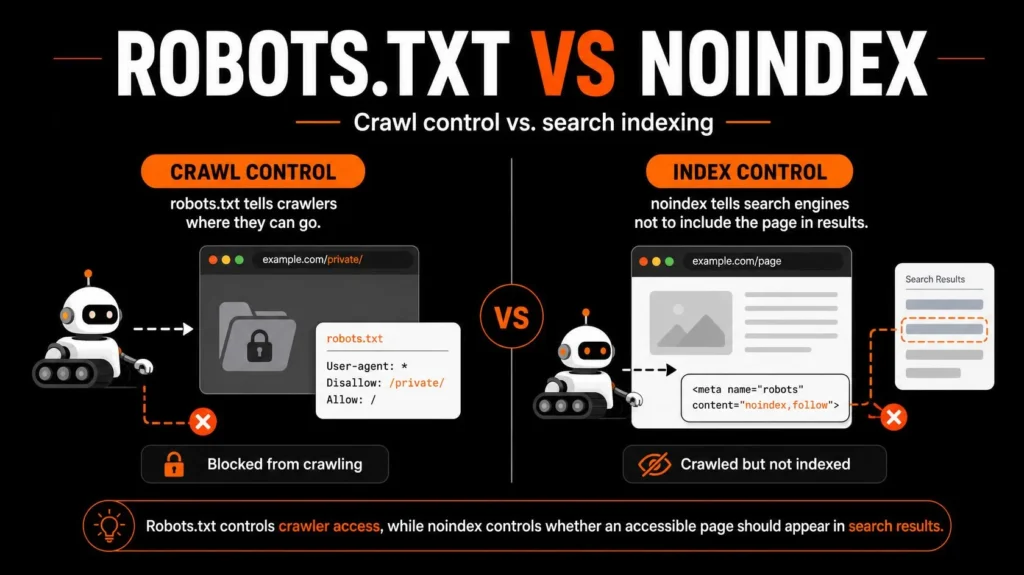
Robots.txt controls crawling. Noindex controls whether a page should appear in search results. They solve different problems, and using one in place of the other can leave unwanted URLs indexed or prevent Google from reading instructions intended to remove them from search.
The right choice depends on what you want to achieve: restrict crawler access, keep a page out of Google Search, consolidate duplicate URLs, or protect private content.
This guide explains when to use each directive, how they interact, how to implement them safely, and how to check the results.
Robots.txt vs Noindex: The Core Difference
The difference between robots.txt and noindex is the stage of search processing they influence.
A robots.txt file tells compatible crawlers which URL paths they may or may not request. A noindex directive tells a search engine that can access the resource not to include it in its search index.
| Factor | robots.txt | noindex |
|---|---|---|
| Primary purpose | Control crawler access | Prevent indexing |
| Typical location | Root-level robots.txt file | HTML meta tag or HTTP response header |
| Can a crawler fetch a restricted URL? | The matching Disallow rule tells it not to | The URL needs to remain accessible so the directive can be read |
| Does it reliably remove a URL from Google Search? | No | Yes, when Google crawls the resource and processes the directive |
| Common use | Restrict crawler access to selected URL patterns | Keep a publicly accessible page or resource out of search results |
| Can it protect confidential information? | No | No |
| Relevant tools | Robots.txt inspection and testing | URL Inspection and indexing reports |
Google explicitly warns that robots.txt is not a mechanism for keeping a page out of Google. A blocked URL can still appear in search results if Google discovers its URL through other signals, even when it cannot fetch its content. A noindex directive must be accessible to the crawler to work as intended. (Google’s robots.txt documentation; Google’s noindex documentation)
A simple way to remember the difference is:
robots.txt: Should a crawler request this URL?
noindex: Should this resource appear in search results?
For a wider review of crawling, indexation, canonicals, sitemaps, and internal links, see the Technical SEO Service.
What Does robots.txt Control?
A robots.txt file contains rules for crawlers. It normally sits at the root of a host, for example:
https://example.com/robots.txt
The rules can identify a crawler with User-agent and specify URL paths that should not be crawled with Disallow. An Allow rule can permit a path within a broader restricted area where the rules and crawler support allow it.
For example:
User-agent: *
Disallow: /internal-search/
Disallow: /temporary-exports/
Allow: /
This illustrative configuration asks matching crawlers not to request URLs under /internal-search/ or /temporary-exports/, while allowing crawling elsewhere under the relevant rules.
The example is not a recommendation to block these paths on every website. Review the site’s actual URL structure before adding any restriction.
What robots.txt does not control
Robots.txt does not guarantee that a URL will disappear from search results. It also does not prevent someone from opening a public URL in a browser.
If a page must not appear in Google, use the appropriate indexing directive instead of relying on Disallow alone. If a resource contains confidential information, restrict access through authentication or another effective access control.
Avoid blocking resources such as CSS and JavaScript indiscriminately. Search engines may need access to these resources to understand how a page is rendered. A restriction can interfere with that process without solving the underlying indexing problem.
Robots.txt is most useful when your goal genuinely concerns crawler access, not when you simply want to hide a page from search.
For a deeper technical review, your SEO Audit Service can serve as the relevant next step for identifying the causes of crawling and indexation issues.
What Does Noindex Control?
A noindex directive tells supported search engines not to include an accessible resource in search results after they discover the directive.
For an HTML page, the common implementation is a robots meta tag:
<meta name="robots" content="noindex">Place this tag in the page’s HTML. The important requirement is that Google must be able to crawl the URL and read the directive.
The tag can be applied to a page that should remain accessible to users through a direct URL or a link, but should not be listed in search results.
When is noindex useful?
Examples include:
A thank-you page that offers little standalone search value.
An internal search-results page that should not appear as an organic result.
A temporary public page that should not be indexed.
Certain low-value account or utility pages that should remain accessible to users but do not need search visibility.
These are examples, not universal rules. An ecommerce filter page or a category page may have useful search demand and could deserve indexing. Decide based on its unique value and intended purpose.
What is an X-Robots-Tag?
The X-Robots-Tag is an HTTP response header that can deliver indexing instructions without inserting a meta tag into HTML. It is particularly useful for resources such as PDFs and other non-HTML files.
An illustrative HTTP header is:
X-Robots-Tag: noindexFor instance, if a publicly accessible PDF should not appear in search results, an appropriate HTTP response header can communicate that instruction. The server must actually return the header on the resource’s response.
Google supports both the robots meta tag and the X-Robots-Tag for relevant indexing instructions. A noindex instruction should not be placed in robots.txt, because Google does not support noindex as a robots.txt rule.
When Should You Use robots.txt vs Noindex?
Choose the directive based on the problem, not simply because an SEO tool has highlighted a URL.
| Situation | Preferred starting point | Why |
|---|---|---|
| A public page should not appear in search | noindex | Gives the crawler an indexing instruction |
| A large collection of low-value URL combinations creates a crawl problem | Evaluate robots.txt and URL architecture | Crawl control may help, but blocking also prevents reading page-level directives |
| A private account page contains confidential information | Authentication or access control | Robots directives are not security measures |
| Duplicate URLs should consolidate into one preferred URL | Evaluate canonical tags or redirects | Canonicalisation and redirects address URL consolidation |
| A useful service page should rank | Keep it crawlable and indexable | Blocking or noindexing it conflicts with the goal |
| A PDF must not appear in search | Consider X-Robots-Tag | Supports indexing instructions for non-HTML resources |
| A staging environment must not be publicly accessible | Password protection or equivalent access control | Prevents unauthorised access rather than relying on crawler behaviour |
Use robots.txt when crawler access is the actual concern
A site with extensive sorting and filtering options might generate many combinations of URLs. A crawl-control strategy may be appropriate for selected URL patterns, but it needs careful analysis.
Do not block all URLs with query parameters automatically. Some parameters may be needed for useful pages, tracking, pagination, or important product variations. Determine which patterns create a real problem and whether blocking them could restrict access to valuable content.
Use noindex when search visibility is the actual concern
Suppose a website contains a public /thank-you/ page after a form submission. Visitors should be able to reach the page, but it does not need to appear as an organic search result.
An appropriate page-level noindex instruction is generally a better fit than blocking the URL through robots.txt. This lets the crawler read the instruction and process the page accordingly.
Use canonicalisation for duplicate or similar content
Canonical tags help indicate the preferred URL among duplicate or similar resources. They are not equivalent to noindex, and robots.txt should not be used as a canonicalisation method.
For instance, a product may be reachable through multiple URL variations created by filters or tracking parameters. Before excluding those URLs, work out whether they represent duplicates, useful independent landing pages, or unnecessary crawl paths. Canonicals and redirects may be more appropriate for consolidating duplicates.
What Happens When robots.txt and Noindex Conflict?
A conflict occurs when a URL is blocked from crawling while its HTML contains a noindex tag or its HTTP response contains an X-Robots-Tag directive.
Google cannot reliably process an instruction that it cannot access.
Imagine a URL has the following properties:
The robots.txt file disallows the URL.
The page contains
<meta name="robots" content="noindex">.Googlebot cannot fetch the page because of the robots.txt rule.
In this situation, Googlebot cannot read the meta tag on that crawl. The URL could therefore remain represented in search results based on information Google already has or discovers elsewhere.
How to resolve the conflict
If the goal is to remove the URL from Google Search, the safer starting process is to allow crawling, ensure the correct noindex directive is present in the response, and check the URL in Google Search Console.
After Google has processed the directive, reassess whether a crawl restriction is needed for a separate reason. Do not assume that blocking the URL will automatically complete the deindexing process.
If the URL contains confidential information, do not depend on either directive. Restrict access at the server or application level.
For a broader explanation of technical eligibility and discoverability, see How to Make Your Business Website AI-Search-Friendly.
How to Implement the Right Directive
Follow this workflow before editing robots.txt or changing an indexing setting.
Step 1: Define the intended outcome
For each URL or URL pattern, choose the goal:
Keep the URL accessible and searchable.
Keep the URL accessible but exclude it from search results.
Restrict crawler access to a specific path.
Consolidate duplicate URLs.
Prevent unauthorised access.
These goals are different. Choose the mechanism that addresses the specific problem.
Step 2: Check the current state
Inspect the URL before changing anything. Check its HTTP status, canonical URL, robots meta tag, response headers, robots.txt rules, internal links, and inclusion in the XML sitemap where relevant.
A URL that fails to index may have a different cause, such as a redirect, inaccessible response, conflicting canonical, weak discovery, or content that Google has not selected for indexing.
Step 3: Apply the correct directive
For a public HTML page that should not appear in Google, use the appropriate noindex meta tag or response header.
For a crawler-access concern, assess the exact robots.txt path and the consequences of blocking it.
For duplicates, evaluate canonicalisation and redirects. For confidential content, use access controls.
Step 4: Check CMS and server settings
On WordPress websites, inspect the page-level search-visibility setting, SEO plugin configuration, template output, and any server-level rules that may affect the response.
An individual page may have different settings from the rest of the site. A template or plugin can also produce directives that are not obvious from the page editor alone.
Your WordPress SEO Service is a relevant internal resource for broader WordPress configuration concerns. For page-level optimization, consult the On-Page SEO Service.
Step 5: Test what the crawler receives
Do not rely only on the settings panel or the source file you intended to change. Inspect the live URL and confirm what is actually returned.
Check the page’s HTML for robots meta tags and its HTTP response headers for X-Robots-Tag. For robots.txt, review the relevant user-agent rules and URL patterns.
Step 6: Monitor the result
Use Google Search Console to check the URL’s crawling and indexing status. Request indexing where appropriate after you have corrected the underlying issue, but do not assume that a request guarantees inclusion or immediate processing.
For sites with large numbers of URLs, review the pattern and template responsible for the issue instead of treating each URL as an isolated problem.
How to implement noindex in WordPress
A typical WordPress workflow is:
Open the relevant page or post in the WordPress editor.
Locate the SEO plugin’s advanced robots or search-visibility settings.
Set the page to noindex if that is the correct goal.
Save or update the page.
Check the live HTML or rendered output to confirm the directive is present.
Verify that robots.txt does not block crawling of the page.
Test the URL in Search Console.
The exact labels and screens depend on the plugin and version. Do not add a second meta tag without checking whether your plugin already outputs one.
How to add an X-Robots-Tag header
For resources that are not HTML, a noindex response header may be the correct option. For example:
HTTP/1.1 200 OK
Content-Type: application/pdf
X-Robots-Tag: noindex
This is an illustrative response, not code to paste into every server configuration. The header must be configured through the server or application that serves the file, and the final response should be tested.
If the website relies heavily on scripts or rendering behaviour, review the wider technical setup as part of SEO-friendly web design. If blocked resources are affecting performance or rendering, your website speed optimization resources may also be relevant.
Practical Examples: Which Directive Should You Choose?
These examples illustrate how the decision should work. They are scenarios, not claims about results from a real client project.
Example 1: A thank-you page appears in Google
Problem: A form confirmation page is accessible publicly, but it has no standalone search purpose.
Likely solution: Add an appropriate noindex directive and make sure Google can crawl the page to read it. Review existing indexed status afterward.
What to avoid: Blocking the URL first and expecting Google to read a noindex tag that is no longer accessible.
Example 2: An ecommerce store creates thousands of filter URLs
Problem: Product filters, sort orders, and parameters create many URL combinations.
Likely solution: Classify those URLs first. Some may be duplicates or low-value combinations; others may be genuine category landing pages that deserve search visibility. Evaluate canonicals, URL design, internal links, and selective crawl restrictions based on the intended outcome.
This issue deserves special care on larger stores. Your Ecommerce SEO Service is a related resource for product discovery, crawl paths, and technical ecommerce considerations.
Example 3: A staging website must remain private
Problem: Developers have created a pre-launch version of a website.
Likely solution: Use password protection or another suitable access control. Robots.txt and noindex are not substitutes for authentication.
Example 4: A PDF should remain accessible through a direct link but not appear in search
Problem: Users need a downloadable document, but search visibility is not desired.
Likely solution: Evaluate an X-Robots-Tag response header and confirm that the crawler can fetch and process the file.
Example 5: A service page has accidentally been set to noindex
Problem: A page intended to attract organic search traffic contains a noindex directive.
Likely solution: Remove the unintended directive, check the robots.txt rules, verify the canonical URL and HTTP status, then test the live page in Search Console.
Changing the directive is only the first step. The page must also meet Google’s broader eligibility and quality requirements before it can appear in search results.
Common Mistakes to Avoid
1. Using robots.txt to remove a page from Google. A blocked URL may still appear in search results. Use an appropriate index-control mechanism when the goal is exclusion.
2. Blocking a page that still needs to be deindexed. Google may no longer be able to read the noindex directive. Allow crawling when Google needs access to process the instruction.
3. Writing noindex in robots.txt. Google does not support a noindex directive in robots.txt. Use a meta tag or the appropriate HTTP header.
4. Treating noindex as a canonical tag. Noindex excludes a resource from search results. A canonical tag signals a preferred URL for a duplicate or similar resource. Choose according to the actual objective.
5. Blocking important page resources indiscriminately. CSS and JavaScript may be needed to render the page appropriately. Review specific dependencies before restricting them.
6. Depending on robots.txt for security. A public URL is still accessible to people unless effective access controls prevent access. Use authentication for sensitive content.
7. Changing a whole URL directory without testing. Broad rules can affect valuable pages unintentionally. Test representative URLs before applying a widespread rule, especially on WordPress and ecommerce sites.
How to Check the Result in Google Search Console
Google Search Console’s URL Inspection tool helps establish what Google knows about a URL and supports live testing of many requirements for appearing in Search. The robots.txt report and page-indexing information can provide additional diagnostic context.

Use this workflow after implementing a change.
Inspect the URL. Enter the full URL in Search Console.
Review crawl access. Check whether Google is allowed to crawl the resource.
Review indexing permission. Check whether Google has detected a noindex directive.
Check the canonical URL. Confirm that the preferred URL is the intended one.
Run a live test. Where appropriate, inspect the current page rather than relying only on the last indexed version.
Check the sitemap. Confirm that important, indexable URLs are included where appropriate, and review whether excluded URLs are being submitted unnecessarily.
Review internal links. Make sure important pages remain discoverable through relevant navigation and contextual links.
Monitor the reported state. Recheck after Google has had time to crawl and process the change.
A successful live test does not guarantee indexing. Likewise, submitting a sitemap or requesting indexing does not guarantee that Google will include a URL in search results.
A practical diagnosis sequence
If a page remains indexed when it should not, verify that the response contains the intended noindex instruction and that crawling is allowed.
If a page should be indexed but is excluded, investigate the reported reason. Check for an accidental noindex directive, a robots.txt restriction, an unsuitable canonical, redirects, a non-successful HTTP status, and whether the page is discoverable.
If the page is technically accessible and indexable but still does not appear, review the wider content and search-intent context. Technical eligibility alone does not guarantee indexing.
Final Checklist: Robots.txt vs Noindex
Use this list before publishing a technical change.
Technical SEO is more manageable when each directive has a clear purpose. The goal is not to block as many URLs as possible, or to remove every page that looks unimportant. It is to make sure the correct pages are accessible and eligible for search, while controlling unnecessary or unsuitable URLs where there is a real reason to do so.
When the cause of an indexing problem is unclear, begin with diagnosis rather than broad rules. This is also the approach covered by my SEO Audit Service and Technical SEO Service.
Frequently Asked Questions
Does robots.txt prevent a page from being indexed?
No. Robots.txt controls crawling, not indexing. Google may know that a blocked URL exists through other signals and may show the URL in search results without being able to access its content. Use an appropriate noindex directive when your objective is to keep an accessible page out of search.
Can I use robots.txt and noindex together?
They can exist on the same website, but blocking a page prevents Google from reliably reading its noindex directive while the block remains in effect. If a page needs to be removed from search, allow crawling so Google can process the directive.
How long does noindex take to work?
There is no universal processing time. Google must crawl the URL and process the directive before the indexed state can change. Timing can vary, so inspect the page and monitor Search Console instead of relying on a fixed deadline.
Can noindex be used on PDFs?
Yes. A server can return an appropriate X-Robots-Tag: noindex HTTP response header for a PDF. Confirm that the header is present on the actual file response and that the resource is accessible to Googlebot.
Does noindex damage a page’s ranking?
Noindex is an instruction that excludes the page from search results when processed. It is not a replacement for ranking optimization, and a noindexed page cannot serve as a normal organic search result while excluded from the index. Apply it only when exclusion is the intended outcome.
Is robots.txt a way to protect private pages?
No. Robots.txt is publicly accessible and is not an access-control mechanism. Use authentication or another effective security control for confidential files, staging websites, private account pages, and other restricted content.
About the Author
Md Mynul Hassan is an SEO, AEO, GEO, and Brand Visibility Specialist based in Bangladesh, working remotely with businesses.
His work covers technical SEO, crawlability, indexation, content structure, internal linking, and search visibility. For related guidance on search accessibility and content discoverability, see his AEO and GEO consulting service and content strategy and SEO writing service.
To follow his work or review his professional profiles: