
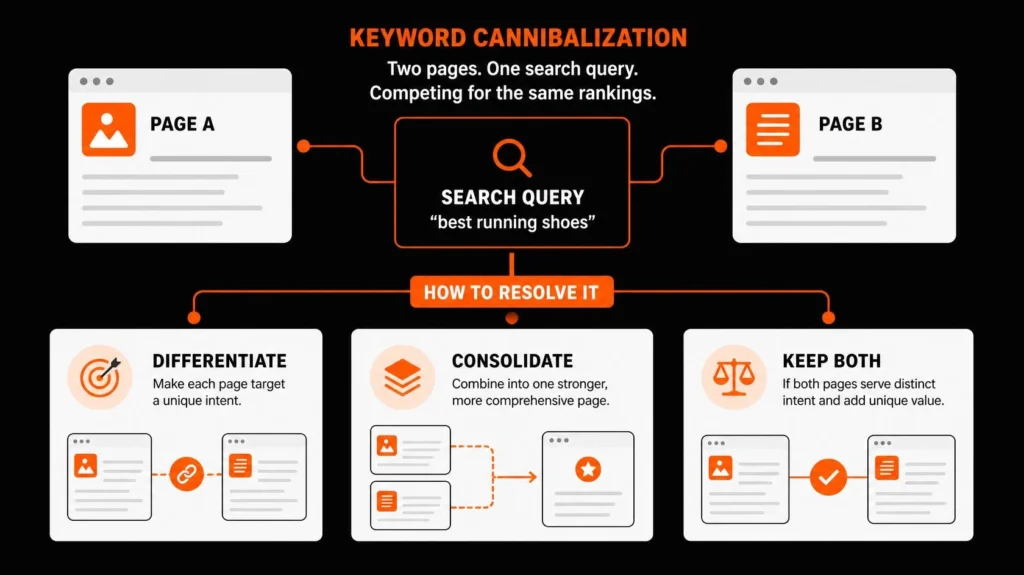
Keyword cannibalization happens when two or more pages on a website target the same or substantially overlapping search intent and compete for visibility in search results. It can become a problem when Google repeatedly selects the wrong URL, the pages divide valuable traffic, or one page prevents another from becoming the clearest answer to a searcher’s question.
The right fix is not always to merge pages. First, use Google Search Console and a search-intent review to confirm whether the overlap is harmful. Then decide whether to update, differentiate, consolidate, redirect, or correct the canonical signals of the affected pages.
This guide explains how to identify competing pages, determine which URL should serve each query, implement the appropriate fix, and prevent the same problem from returning.
What Is Keyword Cannibalization?
Keyword cannibalization is an SEO issue in which multiple pages on the same website compete for the same or very similar search intent. Instead of each URL serving a distinct purpose, the pages overlap enough that it becomes difficult to establish which one should be the primary result for a particular query.
For example, a website might have two articles titled “How to Choose SEO Keywords” and “Keyword Selection Guide.” Both may target people looking for the same basic instructions. If their content, intent, and target queries substantially overlap, maintaining both pages may offer less value than improving one definitive resource.
The issue is not simply that the same phrase appears on two pages. Websites naturally use related terms across multiple pages. The important question is whether those pages are competing to satisfy the same search need.
Keyword Cannibalization vs. Duplicate Content
These concepts are related, but they describe different problems.
| Concept | What it means | Appropriate response |
|---|---|---|
| Keyword cannibalization | Pages compete for the same or overlapping search intent | Review query performance and page purpose, then differentiate or consolidate if justified |
| Duplicate content | Identical or substantially similar content exists at multiple URLs | Investigate URL variants, canonicalization, and whether a redirect or other consolidation is appropriate |
| Natural topic overlap | Related pages discuss some of the same concepts but satisfy different needs | Keep both pages if each provides a distinct, useful purpose |
| Intentional multiple rankings | Two pages from the same site appear for a query but serve different needs | Usually preserve both while monitoring their performance |
Google does not automatically penalize a site merely because some content is duplicated or because multiple URLs appear for a keyword. Google’s canonicalization systems select a representative URL among duplicate or substantially similar pages, considering different signals.

The practical distinction is important: do not delete useful content until you understand what each page contributes.
Is Keyword Cannibalization Always Bad for SEO?
No. Multiple pages can rank for the same search query without causing a problem. A broad topic may legitimately support a guide, a tool, a category page, and a service page because each serves a different intent.
Consider a user searching for “keyword research.” The user might want an explanation of the process, a list of tools, or professional help developing a keyword strategy. Separate pages can serve these different needs.
The overlap deserves attention when evidence suggests that the pages are competing in a way that harms the intended search experience or business outcome.
Before fixing anything, ask three questions:
Do the pages satisfy substantially the same search intent?
Is Google selecting a less appropriate URL, or are the pages dividing valuable search opportunities?
Would changing the page structure make the content clearer and more useful?
If the answer to these questions is no, no change may be necessary.
Signs Your Pages May Be Competing
Look for several signals together rather than treating one symptom as proof.
Landing-page switching: Different URLs appear for the same important query over time.
Overlapping query targets: Two articles target nearly identical topics without clear differences in audience or purpose.
The wrong page appears: An informational blog post is frequently shown when the user should reach a commercial service page, or the opposite.
Weak differentiation: Similar pages repeat explanations without providing distinct examples, use cases, or next steps.
Unclear internal links: Internal links point to different pages for the same topic without a clear reason.
Poor overall outcomes: The overlap coincides with weaker clicks, lower-quality visits, or fewer relevant enquiries.
These are diagnostic clues, not automatic grounds for deleting content. Seasonal demand, changes in competitors, algorithm updates, page quality, and other factors can also influence performance.
How to Find Keyword Cannibalization in Google Search Console
Google Search Console is a practical starting point because it shows which queries and pages receive search impressions and clicks. Its Performance report allows you to examine query-level and page-level data. Some queries are anonymized, and the report has data-display limitations, so it should not be treated as a complete record of every search.
Use this workflow to investigate potential conflicts.
Step 1: Choose the queries that matter
Start with searches that are important to your business, not every keyword in the account.
Prioritize queries that relate to your main services, high-value content, relevant leads, or pages that have recently lost visibility. If you have hundreds of pages, begin with a manageable list of high-priority queries.
Record the target keyword, intended URL, search intent, and business purpose. This gives you a reference point for determining whether Google is showing the right page.
Step 2: Review query and page performance
In Google Search Console:
Open Performance → Search results.
Select an appropriate date range.
Open the Queries view and identify a target query.
Apply a query filter if you need to isolate that search.
Open the Pages view while retaining the filter.
Review which URLs receive impressions and clicks for that query.
If two or more pages appear, investigate further. Their presence alone does not establish a problem.
Step 3: Compare the competing URLs
For each potentially overlapping URL, record:
Clicks and impressions.
Click-through rate (CTR).
Average position.
Recent performance compared with an earlier period.
The content’s purpose and target audience.
Relevant conversions, where tracking is available.
Check date ranges carefully. Comparing one month with another can be misleading when demand is seasonal. Where possible, compare equivalent periods and account for significant site changes.
Step 4: Examine the pages themselves
Open each URL and assess the content, not just its keyword.
Compare the title, H1, headings, introduction, page type, examples, calls to action, and the question each page is meant to answer.
Two pages with different titles can still satisfy the same intent. Likewise, similar wording does not automatically make two pages duplicates if their purpose and information are meaningfully different.
Step 5: Build a query-to-URL review sheet
A simple spreadsheet can make the findings actionable.
| Query | URL A | URL B | Same intent? | Preferred URL | Next action |
|---|---|---|---|---|---|
| Keyword research guide | Educational guide | Keyword selection article | Yes, likely | Stronger existing resource | Review for consolidation |
| Keyword research service | Service page | Educational guide | No, different intent | Service page for commercial intent | Differentiate and link naturally |
| SEO audit checklist | Checklist article | SEO audit service page | Possibly not | Depends on the query and current results | Review before changing |
These examples are illustrative, not findings from your site’s Search Console account. Actual decisions require the real query, URL, and performance data.
This analysis can form part of a wider website SEO audit, particularly when overlapping URLs also involve indexing, content quality, redirects, or internal-linking issues.
How to Confirm a Real Cannibalization Problem
Before changing any URL, establish whether the pages genuinely compete and which page should own the search intent.
Use four checks.
1. Intent overlap: Would the same user find substantially the same answer on both pages? If the pages serve different needs, overlap may be appropriate.
2. Page selection: Is the preferred URL appearing for the right queries? If Google selects a less suitable page, investigate why the competing URL may be a better match, more useful, more accessible, or more strongly supported by internal links.
3. Performance pattern: Is there evidence of an undesirable change in clicks, visibility, or valuable conversions? A ranking fluctuation alone may have other causes.
4. Business value: Which page should remain available, and what would be lost if the other page were removed? Consider backlinks, useful information, traffic, conversions, and the cost of rebuilding the content.
The goal is to select the right action based on evidence, not to force every query to have exactly one ranking URL.
How to Fix Keyword Cannibalization
There is no single corrective action for every case. The best solution depends on why the overlap exists and whether the URLs should continue to exist separately.
| Situation | Recommended action | Reason |
|---|---|---|
| Both pages serve the same intent and one adds little unique value | Consolidate the useful content into one stronger page | Reduces unnecessary duplication and clarifies the resource |
| The pages serve different intents but target similar terms | Differentiate their content, titles, headings, and purpose | Preserves useful pages while making their roles clearer |
| One URL is being retired and has a close replacement | Use a permanent redirect where appropriate | Sends users and crawlers to the replacement |
| Multiple URL variants represent the same or substantially similar content | Review canonicalization | Helps communicate the preferred URL |
| A page is useful for visitors but should not appear in Search | Consider noindex only when justified by the page’s purpose | Controls indexing rather than attempting to fix every ranking overlap |
| The page is already performing well and serves a distinct need | Leave it unchanged and monitor | Avoids unnecessary loss of useful visibility |
Option 1: Differentiate the pages
Use this approach when both pages have a valid purpose but their content overlaps too much.
For example, a site might have a broad keyword research guide and a separate tutorial about choosing keywords for an ecommerce store. Keep the guide focused on the general process and develop the second page around product categories, product attributes, category-page intent, and ecommerce-specific examples.
Make the distinction visible in the content, not just in the title. Update the introduction, headings, examples, and internal links so each page explains why it exists.
Your on-page SEO service is a relevant commercial destination for readers who need help improving page relevance, content structure, and internal links.
Option 2: Consolidate genuinely overlapping pages
Consolidation is appropriate when the pages serve essentially the same purpose and one well-maintained resource would answer the query more effectively.
A careful process looks like this:
Review the content of both pages and identify useful sections.
Choose the URL that makes the most sense to retain, considering relevance, performance, links, history, and future purpose.
Combine the useful information into a coherent page.
Remove unnecessary repetition and update the remaining content.
Redirect the retired URL to the most relevant replacement when appropriate.
Update internal links that point to the retired URL.
Check the canonical URL, indexability, sitemap, and redirect behaviour.
Monitor search performance after implementation.
Do not automatically retain the page with the most impressions. Impressions, backlinks, content quality, query intent, and business value all matter.
Option 3: Use a 301 redirect when a URL is retired
A permanent redirect is generally appropriate when you are removing a URL and have a substantially equivalent replacement.
For example, if two old articles have been consolidated into one current guide, redirect the retired URLs to that guide. Avoid redirecting unrelated pages simply because they share a keyword.
Before implementing redirects, check the old URL’s backlinks, traffic, historical value, and any external links that may still point to it. Test the redirect and avoid creating unnecessary redirect chains.
Option 4: Review canonical tags carefully
A canonical tag indicates the URL a site owner prefers search engines to treat as representative of duplicate or substantially similar content. It is not a universal cure for keyword cannibalization.
Google treats redirects as a strong canonicalization signal and rel="canonical" as another strong signal, while sitemap inclusion provides a weaker signal. Google may still choose a different canonical URL based on its assessment. See Google’s canonical URL documentation.
Use canonicalization when the URL relationship genuinely calls for it. Do not place a canonical tag on a useful, distinct article simply because another page targets a related keyword.
Option 5: Review noindex, titles, and internal links
A noindex directive can be suitable when a page serves a real visitor need but should not appear in search results. It should not be the default response to two URLs ranking for one query.
Titles and headings can clarify intent, but changing them alone may not resolve deeper content overlap.
Internal links should also support the intended page hierarchy. When a broader topic has its own guide, related pages can link to that guide using descriptive anchors. Commercial service pages should remain focused on their own audience and purpose.
For websites built on WordPress, review plugin-generated canonicals, redirects, indexability settings, and template behaviour during implementation. The WordPress SEO service is relevant where the conflict involves platform configuration rather than editorial strategy alone.
A Practical Example of Competing Pages
Imagine an ecommerce website has two articles:
Page A: “Keyword Research for Online Stores”
Page B: “How to Find Keywords for Ecommerce”
Both explain how to find product keywords, research competitors, assess search demand, and map keywords to pages. Neither provides a meaningful difference in audience, task, or practical value.
The editor finds that both URLs receive impressions for overlapping queries. The first step is to compare their actual performance and examine the search results, then decide whether they serve the same need.
If they do, the editor might combine the strongest material into one guide, retain the more suitable URL, redirect the retired article when appropriate, and update internal links. If Page B instead offers a distinct tutorial on mapping keywords to category and product pages, keeping it separate may be better.
That is the key lesson: make the decision from search intent and page value, not keyword overlap alone.
Ecommerce websites should be especially careful with category, product, filter, and editorial URLs because similar labels can conceal different purposes. Your Ecommerce SEO service is a relevant resource when overlapping pages are part of a larger ecommerce architecture issue.
How to Prevent Keyword Cannibalization
The easiest recurring problem to fix is one you can prevent during content planning.
Maintain a keyword-to-URL map
Keep a central spreadsheet or content database with one row per important URL. Include:
URL and page type.
Primary keyword and supporting themes.
Search intent and intended audience.
Main user question.
Parent topic or content cluster.
Related internal links.
Current status and update date.
This is a core part of effective keyword research and keyword-to-URL mapping. Before creating a new page, check whether an existing URL already fulfils that purpose.
Review new topics before publishing
A new keyword does not always require a new page. Similar queries can often be addressed by one page, while different needs may justify separate resources.
Use keyword clustering and search-intent analysis to group terms appropriately. If a new article would repeat an existing page with little added value, improve the existing resource instead.
Your content strategy and SEO content writing service is relevant for planning pillar pages, supporting articles, and internal relationships before content is published.
Keep internal links consistent
Internal links help readers and search engines discover related resources. For each important topic, decide which URL is the main guide and link to it from related content where useful.
This does not mean every related page must link to the same URL or use the same exact-match anchor. Links should reflect each page’s purpose and the reader’s next step.
Audit old content periodically
Content overlap can develop gradually as a website grows. An old article, a newer guide, and a service page may gradually start answering the same questions.
Review important topics when rankings or traffic change, before a major content refresh, and during routine content audits. A technical SEO review can help investigate indexing, canonicalization, redirects, and site architecture when the cause is not purely editorial.
How to Measure the Results After Fixing Competing Pages
After making changes, keep a record of the affected URLs, queries, and implementation date. That will help you distinguish a likely improvement from ordinary search fluctuations.
Track these metrics:
Organic clicks and impressions: Did the retained URL gain or lose visibility for the target queries?
CTR: Did the proportion of clicks relative to impressions change? Interpret this alongside position, search appearance, and the type of query.
Average position: Did the preferred URL become more visible? Average position is an aggregate measure, so use it alongside other metrics rather than treating it as a definitive diagnosis.
Query-to-page distribution: Are the intended URLs appearing for their assigned query groups?
Conversions: Are the pages generating relevant enquiries, sales, bookings, or other outcomes that matter to the business?
Technical implementation: Does the retired URL redirect correctly? Is the retained page indexable and using the intended canonical URL? Have unnecessary internal links to retired pages been updated?
There is no universal timeframe in which a fix must produce an improvement. Search engines need to recrawl and reassess URLs, and outcomes also depend on competition, content quality, and wider changes in search demand.
If performance declines after consolidation, investigate before making another change. Check the redirect target, whether important content was lost, the remaining page’s intent, and whether the original URLs served distinct needs that were overlooked.
Common Keyword Cannibalization Mistakes to Avoid
Merging pages because a tool flags them. A tool can identify overlap, but it cannot reliably decide whether two URLs serve different purposes without further review.
Choosing the winning URL by one metric. The page with the most impressions may not be the best page for the intended query. Consider intent, clicks, links, content, and business value.
Using canonical tags on distinct content. A canonical tag should communicate a legitimate URL preference, not suppress an otherwise useful page.
Redirecting to an unrelated page. A redirect should take users to a relevant replacement, not simply to the homepage or the nearest page with a similar keyword.
Changing titles without reviewing the content. Different titles cannot create meaningful differentiation if two pages answer the same question in the same way.
Removing valuable pages too quickly. Check historical traffic, links, conversions, and the information that would be lost before consolidating content.
Ignoring the wider site structure. Repeated overlap may indicate that the site needs clearer keyword mapping, page ownership, and editorial planning, rather than another isolated fix.
Keyword Cannibalization Checklist
Use this before making a change.
Frequently Asked Questions
Can keyword cannibalization cause a Google penalty?
Not by itself. Having related pages or overlapping keywords does not automatically lead to a penalty. The concern is whether the site structure, content, or technical signals create an actual problem for search visibility or users. Investigate the evidence before making changes.
Should I always merge pages that target similar keywords?
No. Merge pages when their purpose and search intent substantially overlap and a consolidated resource would serve readers better. Keep separate pages when each offers a distinct answer, audience, use case, or commercial purpose.
Will changing the title tag fix keyword cannibalization?
Sometimes a title change can clarify a page’s purpose, but it is not a complete solution when the underlying content and intent remain the same. Review page content, internal links, and the intended query-to-URL relationship as well.
Should I noindex a page that ranks for the same keyword as another page?
Not automatically. A page may have value even if another URL appears for the same query. Use noindex only when there is a sound reason for keeping the page available while excluding it from search results, and review other options first.
How often should I check for keyword cannibalization?
Review it during content audits, before publishing a new page on an established topic, and when important queries show unexplained changes. A fixed monthly schedule may suit some large sites, while smaller websites can prioritise high-value pages and review them when meaningful changes occur.
The Next Step: Give Every Important Page a Clear Purpose
Keyword cannibalization is best handled as a page-planning and diagnosis problem, not as a blanket rule against overlapping keywords. Identify the query, understand the search intent, determine what each URL contributes, and make changes only when the evidence supports them.
A structured keyword map helps prevent future overlap, while an SEO audit can reveal whether the issue extends to content quality, internal links, redirects, indexing, or canonicalization.
For businesses that need help reviewing those relationships, my Keyword Research Service and SEO Audit Service are relevant starting points. The objective is to create a website where every important page has a clear purpose and provides a useful answer to the people searching for it.
About Md Mynul Hassan
I’m Md Mynul Hassan, an SEO, AEO, GEO and Brand Visibility Specialist based in Bangladesh, working remotely with businesses. My work covers keyword research, search-intent analysis, technical SEO, content strategy, and website visibility. You can read more about my professional background or use my SEO consultation and contact page to discuss a project.
Connect with me and explore my profiles:
LinkedIn: Md Mynul Hassan
YouTube: Md Mynul Hassan on YouTube
Facebook: Md Mynul Hassan SEO
Upwork: Hire Md Mynul Hassan on Upwork
Freelancer.com: Md Mynul Hassan on Freelancer.com