
A good heading structure helps readers understand a page before they read every paragraph. It establishes the main topic, divides information into useful sections, and shows how individual points relate to one another.
For SEO, the practical goal is to make the page’s content clear and logically organized. For accessibility, semantic headings help people navigate sections using assistive technology. Clear sections can also make information easier to find and interpret in answer-oriented search experiences, although no heading formula guarantees rankings, featured snippets or AI citations.
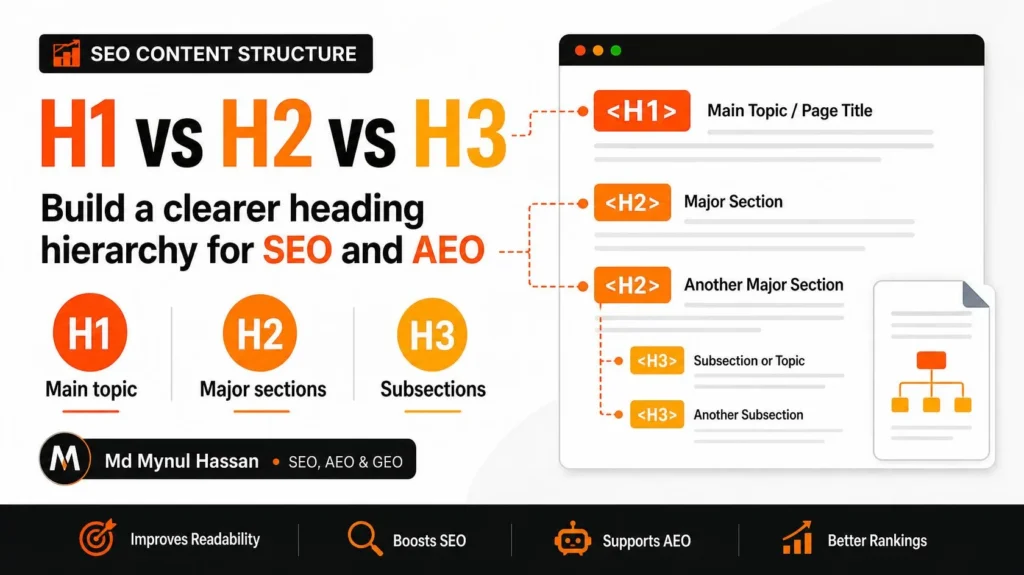
The simplest working rule is to use one clear H1 for the main page topic, H2s for major sections, and H3s for subsections within those sections. Choose each heading level according to its meaning, not the font size you want.
What Is Heading Structure in SEO?
Heading structure is the logical organization of a webpage’s sections using HTML heading elements, from H1 through H6. These elements identify the main topic and the different levels of supporting information.
For example, an article about technical SEO might use an H1 for its overall subject, H2 headings for crawling, indexing and internal linking, and H3 headings for specific problems within those sections.
Heading structure serves three practical purposes:
Navigation: Readers can scan the page and locate relevant information.
Semantic organization: The HTML communicates which topics are major sections and which are subordinate.
Content clarity: Authors can identify missing explanations, unrelated sections and repeated material while developing an outline.
This makes headings part of on-page optimization, but they should not be treated as isolated ranking tricks. Your On-Page SEO service connects headings with search intent, page content, metadata, internal links and overall relevance.
How H1, H2 and H3 Headings Differ
The main difference is the level of information each heading introduces.
| Heading tag | Primary role | Example |
|---|---|---|
| H1 | Identifies the main subject of the page | Heading Structure for SEO |
| H2 | Introduces a major section | How H1, H2 and H3 Headings Differ |
| H3 | Divides a major section into related subsections | When to Use an H3 Heading |
| H4 | Divides an H3 subsection when further structure is genuinely needed | Nested Example of Heading Hierarchy |
| H5-H6 | Provide deeper levels of organization | Rarely required in a typical blog post |
Most articles only need H1, H2 and H3. Use H4, H5 or H6 when the content’s actual structure requires them, not because every available HTML level should appear on the page.
What should an H1 do?
An H1 should clearly identify the main subject a visitor will find on the page. It usually serves as the visible primary heading of an article, guide, service page or landing page.
A useful H1 is specific enough to set expectations without attempting to include every related keyword.
Weak example:
SEO Tips
Better example:
How to Structure H1, H2 and H3 Headings for SEO
The improved heading tells readers what the page will explain. It also creates a natural starting point for the sections that follow.
What should an H2 do?
An H2 should introduce a major question, topic or stage of the explanation. Each H2 should contribute a distinct part of the page’s overall purpose.
For the example above, useful H2 headings might include:
How H1, H2 and H3 Headings Differ
How to Create a Logical Heading Hierarchy
Common Heading Structure Mistakes
How to Audit Heading Structure
A reader should be able to scan the H2s and understand the broad coverage of the article without reading every paragraph.
When should you use an H3?
Use an H3 when a major section contains multiple distinct points that need their own headings.
For example, under an H2 titled “How H1, H2 and H3 Headings Differ,” H3 headings can explain the specific role of H1, H2 and H3.
If a section contains only one brief point, an additional H3 may not be necessary. A sentence or list item inside the H2 section may communicate the same information more clearly.
Does Heading Structure Affect SEO?
Heading structure supports good on-page organization, but there is no heading formula that guarantees higher rankings. Descriptive headings help readers understand a page, while semantic HTML makes the hierarchy available to browsers and assistive technologies. Search engines evaluate the page in a broader context, including its content and relevance to the query.
Google’s documentation on title links explains that its systems can draw title-link information from several page elements, including the title element, prominent headings and other content. This is a reason to maintain consistent, descriptive page titles and headings, rather than evidence that changing an H2 alone will improve rankings.
Why headings are useful for on-page optimization
Headings help an author communicate the purpose of each section. They also provide a practical structure for answering related questions without repeating the same explanation throughout the page.
Consider a webpage targeting a bookkeeping service. A page that uses the same generic heading repeatedly may leave readers unsure which services, qualifications or next steps are covered.
A more informative hierarchy could identify the service, explain who it is for, outline the process, answer common questions and present the next step.
The content still needs to be accurate, helpful and relevant. Heading tags cannot compensate for an unclear offer or missing information.
How headings support AEO and AI search
Answer-focused content benefits when questions and explanations are easy to identify. A descriptive heading followed by a direct answer can help a reader locate the relevant passage quickly.
For example, the heading “How many H1 tags should a page have?” is clearer than “Heading considerations.” It tells the reader precisely what the section answers.
This is useful for an answer-oriented writing process, but it does not mean that search or AI systems must select the passage. Their selection decisions are not controlled by heading tags alone.
My AEO and GEO consulting service connects answer clarity with broader SEO, content quality, entity information and technical accessibility.
How to Create a Logical Heading Hierarchy
Build the hierarchy from the purpose of the page, not from a list of keywords that must appear in headings.
Step 1: Identify the primary search intent
Decide what a person expects to learn or accomplish after opening the page.
A guide about heading structure needs to explain what the heading levels mean, how they relate, how to use them and how to correct common errors. A service page about heading optimization needs to explain the service, the problems it addresses and how a customer can proceed.
Those pages may cover related concepts, but their headings should reflect different purposes.
Your keyword research service can support this stage by connecting query research with page purpose and the searcher’s decision process.
Step 2: Group related questions
Do not create a separate heading for every keyword variation. Group questions that share the same underlying intent.
For example, “What does an H2 do?”, “When should I use an H2?” and “How many H2s should a page have?” may fit naturally within a larger section about using H2 headings.
A separate subsection is justified when the answer needs a distinct explanation, example or troubleshooting step.
This approach also keeps the article from becoming a collection of repetitive keyword headings.
Step 3: Draft the outline before the full content
Write the H1 and major H2 sections first. Then add H3s only where they help explain a specific part of an H2.
Review the outline in isolation.
Ask whether the sequence makes sense to someone unfamiliar with the topic. Check for gaps, overlapping sections and headings that promise information the article never provides.
My Content Strategy and SEO Content Writing service supports this broader process of aligning topic coverage, intent, content structure and useful next steps.
Step 4: Write descriptive headings
A heading should tell the reader what follows. Avoid vague labels that provide little context.
| Vague heading | More descriptive heading |
|---|---|
| Benefits | Why a Logical Heading Hierarchy Helps Readers |
| Problems | Common Heading Structure Mistakes |
| Tips | How to Write Clear H2 and H3 Headings |
| Summary | Heading Structure Checklist |
The better versions communicate the section’s purpose. They are more useful to people scanning the article and more consistent with an answer-first content approach.
Step 5: Match heading levels to meaning
Once the outline is clear, assign the correct HTML heading element to each item.
An H3 should normally belong to an H2 section. When you move to a new major section, return to H2 rather than continuing with H3 simply because the previous section used it.
This does not mean every heading on the entire page must increase by one level forever. The hierarchy should reflect the relationships between the current sections.
Step 6: Style headings separately
Choose the heading level because of its semantic role. Use CSS to control its appearance.
A designer might want a visually large heading beneath an H2. That does not automatically make it an H1. Similarly, a smaller heading is not necessarily an H4.
The HTML element communicates structure; the styling communicates visual presentation.
The W3C guidance on page headings explains how heading ranks help organize content and provide navigation for people using assistive technology.
A Practical Heading Structure Example
Imagine a guide about website speed optimization. Its purpose is to explain common performance issues, how to diagnose them and which improvements to prioritize.
A logical outline could look like this:
H1: Website Speed Optimization: A Practical Guide

    H2: What Is Website Speed Optimization?

    H2: Why Website Performance Matters

    H2: How to Measure Website Speed

        H3: Using PageSpeed Insights

        H3: Reviewing Core Web Vitals

    H2: Common Website Speed Problems

        H3: Oversized Images

        H3: Unnecessary JavaScript

        H3: Poor Server Response

    H2: How to Improve Website Speed

    H2: Website Speed Optimization Checklist
The H1 defines the guide’s subject. Each H2 introduces a distinct section, while the three H3s under “Common Website Speed Problems” identify different issues within that section.
Notice that the next major section returns to H2. It does not continue at H3 simply because the previous section had deeper subsections.
This hierarchy is not a ranking template. It is an example of how to align heading levels with the content’s meaning.
How to Use Keywords in Headings
Use keywords when they accurately describe the section. Do not insert exact-match phrases where they make the heading awkward or repetitive.
A sensible approach is to place the primary topic in the H1, then use related terms and questions in H2s or H3s where they naturally fit.
For an article about heading structure, relevant headings might include “How to Create a Logical Heading Hierarchy” and “Common Heading Structure Mistakes.” Both are clear descriptions of the section without repeating the exact primary keyword.
Example of keyword stuffing
Weak:
SEO Headings for SEO Heading Structure and SEO Headings Optimization
Better:
How to Structure Headings for SEO
The second version communicates the topic in ordinary language. It leaves room for the section to explain the relevant concepts without repeating phrases unnecessarily.
Keyword research should inform the outline, but each heading should serve a reader’s question or a clear organizational purpose.
Common Heading Structure Mistakes
Using heading tags only to change text size
Problem: An author selects H1 or H3 because the default text looks right.
Why it matters: The resulting HTML may not communicate the actual relationship between sections.
Better approach: Choose the heading element based on the content hierarchy, then style the text with CSS.
Treating multiple H1 tags as an automatic ranking penalty
Using one clear H1 as the page’s main heading is a sensible editorial convention. However, finding several H1 elements during an audit does not, by itself, prove that a page has a ranking penalty.
Check why the extra elements exist. A theme may use heading tags in the logo, header, widget or page template. Correct the elements that misrepresent the content hierarchy, and avoid making changes based solely on a warning from an SEO tool.
Skipping heading levels unnecessarily
Moving from an H2 straight to an H4 can create a confusing structure because the hierarchy suggests a missing intermediate level.
Review the intended relationship between the headings. If the H4 is a subsection of an H2, ask whether an H3 is required or whether the H4 belongs at a different level.
The goal is an understandable outline, not compliance with an arbitrary count of headings.
Repeating the same heading text
Repeated headings can make navigation less informative, particularly when separate sections answer different questions.
Be specific enough to distinguish the sections. Two headings can naturally share a broad topic, but their labels should communicate their different purposes when necessary.
Forcing keywords into every heading
Excessive keyword repetition makes content harder to read and can create artificial headings.
Use the primary topic where it belongs. Let related terminology appear naturally in the sections that explain it.
Making a heading promise an answer the section does not provide
A heading phrased as a question creates an expectation. Answer that question directly in the text immediately following it.
If an article has an H2 called “How to Audit Heading Structure,” the section should contain actionable audit steps rather than several paragraphs about the general importance of SEO.
Ignoring headings generated by the website template
A page editor may show one heading hierarchy while the published page contains additional headings from the theme, navigation or widgets.
Review the rendered page and its HTML. When a recurring issue originates in a template, a template-level correction may be more effective than fixing individual articles one by one.
How to Audit Heading Structure on an Existing Website
A useful audit identifies the problem, its cause and the appropriate fix. It should not produce a list of automated warnings that all receive equal priority.
Review the rendered page
Open the published page and inspect its heading elements. Record the H1, H2, H3 and any deeper headings in the order they appear.
Compare that list with the actual content. Look for missing main headings, vague section labels, repeated headings and elements that appear at the wrong level.
For larger websites, a crawler or heading-extraction tool can help identify recurring patterns across templates and pages.
Check the HTML, not just the visual appearance
The page can look properly formatted even when the underlying HTML is poorly structured. Conversely, a visually small heading may have a perfectly valid semantic level.
Inspect the HTML or DOM to see which heading tags are actually rendered. Review template elements alongside the main article, especially if unexpected H1s or repeated headings appear on many URLs.
If the issue involves crawlability, rendering or broader template problems, a technical SEO service may be the appropriate next step.
Diagnose the cause before changing the tags
Use this troubleshooting sequence:
Identify the incorrect or missing heading.
Determine whether it belongs to the page content, theme or reusable template.
Decide what semantic role the heading should have.
Make the smallest appropriate change.
Recheck the published HTML and its relationship with adjacent sections.
For WordPress websites using Elementor, inspect both the widget settings and the rendered page. Do not assume that changing the visible font size or a widget’s styling has corrected its semantic heading level.
Your WordPress SEO service can support this type of page-level and implementation review.
Prioritize structural problems over minor cosmetic differences
A missing or misleading main heading deserves attention. So does a template that introduces irrelevant headings across many pages.
A minor difference in heading capitalization or text size is usually less important than a structure that makes sections difficult to identify or navigate.
The same prioritization principle applies to a broader SEO audit: identify meaningful problems first, then implement and validate corrections.
Heading Structure Checklist
Before publishing a page, review these points:
A checklist is a final quality-control step, not a substitute for reading the page. A page can pass every mechanical check and still have weak content or fail to satisfy the searcher’s intent.
Frequently Asked Questions
What is the difference between a heading tag and a title tag?
A heading tag organizes the visible content of the page, while the HTML title element defines the document title commonly used in browser tabs and considered by search engines when generating search-result title links. They serve related but different purposes, so the page title and H1 should communicate the same overall topic without needing identical wording.
Should every page have an H1?
Using one clear H1 for the main page topic is the most straightforward default for editorial content. It helps establish the page’s primary subject and keeps the outline understandable. If an audit finds additional H1 tags, investigate their purpose and correct misleading template markup rather than assuming that the number alone proves a ranking problem.
Are H4, H5 and H6 headings necessary for SEO?
No. Most blog posts and ordinary business pages can be organized with H1, H2 and H3. Deeper heading levels are appropriate when the content genuinely contains additional nested sections. Adding H4, H5 or H6 only to satisfy an SEO checklist creates unnecessary complexity.
Do headings help answer engines understand a page?
Clear, descriptive headings make the relationship between questions and explanations easier to follow. They can support readable, well-organized content, but they do not guarantee that an answer engine or AI search experience will select the page. Useful content, technical accessibility, topical relevance and trustworthy information remain important.
What should you fix first when heading structure is incorrect?
Start with problems that affect meaning: an unclear main topic, a missing or misleading heading, incorrectly nested sections, or headings generated by a template that do not reflect the content. Then check keyword repetition, wording and presentation. Fix the cause of recurring errors rather than correcting identical symptoms on individual pages repeatedly.
Conclusion: Make the Page Easy to Understand
The most useful heading structure is the one that accurately represents the content. Use a clear H1 for the main topic, H2s for major sections and H3s when they add meaningful detail. Keep semantic hierarchy separate from visual styling, and validate the HTML when template behavior creates unexpected results.
The next step is to check a representative page on your website, compare the published heading hierarchy with the actual content, and fix the most meaningful structural problems first.
When those issues form part of a wider page-optimization project, the On-Page SEO service is the relevant next resource. You can also contact Md Mynul Hassan to discuss page-level SEO priorities.
About the author
Md Mynul Hassan is an SEO, AEO, GEO and Brand Visibility Specialist based in Bangladesh, working remotely with businesses and agencies. His work connects on-page optimization, search intent, content structure, technical SEO and search visibility.
Learn more about Md Mynul Hassan, explore the SEO and AI Search Insights blog, or connect through his professional profiles:
Upwork · Freelancer.com · LinkedIn · YouTube · Facebook