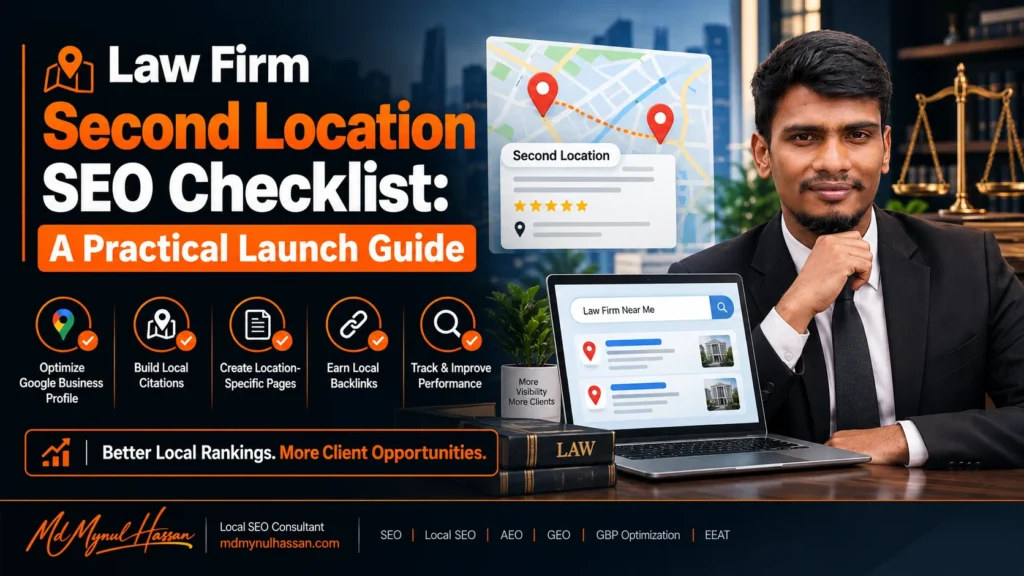
Opening a second law office creates a new local search market. The website, brand and practice areas may stay the same, but the new office needs its own local signals, business information, location page, search targeting and tracking.
A practical law firm second location SEO checklist should therefore cover more than adding a city name to the homepage. Before launch, prepare the location architecture, keyword map, business information and GBP plan. At launch, publish the dedicated location page, establish the eligible Google Business Profile and connect the office to relevant practice pages. After launch, check indexing, citations, reviews, rankings and enquiries.
Google’s documentation supports managing multiple business locations through Business Profile Manager, while its guidelines require businesses to represent their real-world locations accurately.
What Changes When a Law Firm Opens a Second Location?
The biggest change is that the firm is no longer competing in one local market.
The second office introduces another physical entity that needs to be clearly connected to the parent law firm while remaining distinguishable from the original office. That affects Google Business Profile, location pages, local keyword research, citations, reviews, internal links and reporting.
Think of the structure like this:
Law firm → multiple offices → individual location pages → individual local signals → firm-wide practice pages.
The mistake is treating the second office as a small addition to the existing website. It should be treated as a new local search entity within the same firm.
| Single-location firm | Second-location firm |
|---|---|
| One primary local market | Two local markets |
| One location page | One page per office |
| One eligible office GBP | Separate eligible profile for each location |
| One citation footprint | Location-specific citation footprint |
| One review profile | Reviews associated with each location |
| One local competitor set | Separate competitor sets |
Google’s guidance says businesses with different locations can have separate profiles when those locations meet the applicable requirements. Multiple locations can be managed together through Business Profile Manager.
Pre-Launch Checklist for a Second Law Office
Confirm the Office Is a Real Eligible Location
Before doing SEO, confirm that the new office actually qualifies for a Business Profile.
Google requires businesses representing a physical location to accurately represent the real-world business. Address information must be accurate, and virtual offices are not acceptable as physical locations. Google also provides specific guidance for businesses with multiple locations.
Before launch, confirm:
- The office is a genuine business location.
- Clients can receive in-person service there when applicable.
- The business has appropriate staff presence.
- The address is accurate.
- Permanent signage requirements are satisfied where applicable.
- Opening hours are accurate.
- The firm name matches its real-world representation.
- The office has a dedicated phone/contact path where practical.
Do not open a second location simply to create another Google listing. The physical business comes first. SEO should represent the expansion, not manufacture it.
Research Local Keywords and Competitors
Do not copy the first office’s keyword list and replace the city name.
Research the new market separately.
For example, a firm opening in Birmingham might discover searches such as:
- personal injury lawyer Birmingham
- family lawyer Birmingham
- employment lawyer Birmingham
- immigration solicitor Birmingham
- divorce lawyer Birmingham
- business lawyer Birmingham
The actual keyword set depends on the firm’s practice areas and the way people search in that market.
Review:
- Google search suggestions
- Search Console data from existing pages
- local competitors
- practice-area searches
- neighborhood and district modifiers
- “near me” behaviour
- informational legal questions
- commercial consultation searches
Map the keywords to pages before publishing content. Your location page should not try to rank for every legal service.
Plan the Location URL and Page
Use a simple, scalable structure such as:
/locations/birmingham/
or:
/locations/birmingham-office/
The exact URL is less important than having a clear, permanent URL that represents the office.
If the firm has practice-specific local pages, they can sit underneath an appropriate structure where useful, but do not create dozens of near-identical combinations without a genuine reason.
Google’s search documentation recommends logical URL structures and using sitemaps to help search engines discover new or updated pages.
Prepare Business Information
Create a master record for the new office before publishing anything.
Include:
- Exact business name
- Street address
- Suite or floor
- Local phone number where appropriate
- Opening hours
- Office URL
- Email/contact information
- Practice areas offered
- Attorneys working from the location
- Parking information
- Accessibility information
- Directions
- Local areas served
This master record becomes the reference for the website, GBP, legal directories, local citations and other business profiles.
Google Business Profile Checklist for the Second Office
Does the Second Law Office Need Its Own Google Business Profile?
Yes, when the second location is an eligible, real-world location under Google’s guidelines.
Do not try to place two separate physical offices inside one location profile. Google provides tools for managing multiple locations and states that businesses with different eligible locations can maintain profiles for those locations.
The distinction matters because the second office needs to establish its own local relevance.
Before verification:
- Confirm the physical address.
- Prepare signage and supporting evidence if verification requires it.
- Use the real business name.
- Select appropriate categories.
- Enter accurate hours.
- Add the correct website.
- Prepare office-specific photos.
- Make sure the website page already exists or is ready to publish.
Google’s guidelines also state that the business name should reflect the name used in the real world rather than adding keywords or location terms simply for search visibility.
Link the GBP to the Specific Location Page
The second office’s profile should point users to the page that represents that office.
Do not send visitors to the homepage when a dedicated location page exists.
Google’s current Business Profile link policy explicitly says that local business links should lead to a dedicated landing page and that, for multiple locations, location-specific links should lead to the website for that specific location.
This creates a clean relationship:
GBP → Birmingham location page → Birmingham office information → relevant practice pages → enquiry.
Build a Useful Location Landing Page
A law firm location page should help both searchers and search engines understand what exists at that office.
What Should a Law Firm Location Page Include?
At minimum, consider:
- Office name
- Full address
- Phone number
- Opening hours
- Embedded map where useful
- Directions
- Parking or access information
- Attorneys based at the office
- Practice areas actually offered there
- Areas of the city or region served
- Clear consultation/contact options
- Links to relevant practice pages
- Location-specific FAQs where genuinely useful
- Unique information about the office
A good page might explain how clients reach the office, which attorneys work there, what services are available, and what someone should know before arranging a consultation.
That is much stronger than:
“We are a leading law firm serving Birmingham. Contact us today.”
followed by the same paragraph used on every other office page.
What Should You Avoid?
Do not create a template that changes only:
London → Birmingham → Manchester → Leeds
while everything else remains identical.
Google’s Search guidance warns against doorway-style approaches, and current multi-location law-firm discussions consistently identify cloned city pages as a major weakness.
The page should earn its existence by providing information that is genuinely useful for people dealing with that office.
Connect the Second Location to Your Site Architecture
The location page should not become an orphan.
A strong structure looks like:
Homepage
↓
Locations
↓
Birmingham Office
↓
Personal Injury / Family Law / Employment Law
And the reverse relationship should also exist:
Practice Area Page
↓
Birmingham Office
For example, if the Birmingham office handles family law, the family-law page can link to the Birmingham office with an anchor such as:
Family law services at our Birmingham office
The Birmingham location page can then link back to:
Family law services
This helps users move between local intent and service intent without creating unnecessary duplicate pages.
Your existing website already uses Local SEO, Google Business Profile optimization, technical SEO, keyword research, content strategy and internal linking as connected parts of its SEO approach.
NAP, Citations and Reviews Checklist
Keep NAP Consistent
NAP means:
Name + Address + Phone
For the second office, create a citation spreadsheet containing:
| Field | Office 1 | Office 2 |
|---|---|---|
| Business name | Verified format | Verified format |
| Address | Office 1 | Office 2 |
| Phone | Office 1 | Office 2 |
| URL | Office 1 page | Office 2 page |
| Hours | Office 1 | Office 2 |
Audit the firm’s:
- Google Business Profiles
- Bing
- Apple Maps
- Legal directories
- Local chambers
- Industry directories
- Social profiles
- Existing citation providers
- Relevant local publications
Do not change the established office’s information while launching the second location unless there is a genuine reason.
Build Citations for the New Office
Citation building should be selective.
Prioritise:
- Major business platforms
- Important legal directories
- Relevant local directories
- Professional associations
- Local organisations
- Legitimate industry publications
The goal is consistency and legitimacy, not collecting hundreds of low-quality listings.
Build Reviews for the Correct Location
Reviews are associated with the relevant Business Profile. Google also explains that reviews may be moved in specific circumstances when a business relocates, but that does not mean reviews from two independent locations should simply be treated as one shared review pool.
For a new office:
- Ask genuine clients for feedback after appropriate interactions.
- Direct the client to the correct office profile.
- Follow applicable legal advertising and professional conduct rules.
- Never manufacture reviews.
- Never offer inappropriate incentives.
- Respond professionally without revealing confidential client information.
The new office should gradually establish its own reputation.
Technical SEO and Indexing Checklist
Before announcing the second office, test the page technically.
Check these items
- Page returns a normal HTTP status.
- Page is indexable.
- Canonical URL is correct.
- No accidental
noindex. - Robots.txt does not block the page.
- Internal links point to the correct URL.
- XML sitemap includes the page when appropriate.
- Mobile layout works correctly.
- Page loads properly.
- Contact forms work.
- Click-to-call works.
- Map/directions links work.
- Structured data validates.
- Images have useful filenames and alt text.
- Old or temporary URLs are not replacing the canonical location page.
Google recommends using URL Inspection to test how Google sees important pages and recommends submitting or maintaining a sitemap to help discovery.
After publishing, do not assume that submitting a sitemap means immediate indexing. Google explicitly describes sitemaps as a discovery hint rather than a guarantee of crawling or indexing.
Local Schema for the Second Office
Use structured data that accurately represents the visible content.
For the location page, a suitable local-business entity can communicate:
- Name
- Address
- Telephone
- URL
- Geo information where appropriate
- Opening hours
- Relevant business information
Google’s current LocalBusiness documentation says each local business location should be defined as a LocalBusiness and recommends using the most specific applicable subtype.
For the overall firm, Organization structured data can help Google understand the parent organization. Google also allows multiple addresses for organizations operating across multiple cities or countries.
Do not add fake:
- Reviews
- Ratings
- Awards
- Attorney credentials
- Addresses
- Organizations
- Services
Schema should describe the page, not create a fictional version of the firm.
Launch-Day and Post-Launch Checklist
| Timing | Priority checks |
|---|---|
| Before launch | Office eligibility, keyword research, competitors, URL, content, business data |
| Launch day | Location page live, GBP setup/verification, correct URL, contact details |
| First week | Indexing, sitemap, Search Console, citations, internal links, tracking |
| First 30 days | GBP activity, reviews, rankings, impressions, calls, enquiries |
| Monthly | Competitors, citations, reviews, content, technical issues, conversions |
| Quarterly | Location strategy, keyword expansion, page quality, links, performance |
The important point is that the SEO project does not finish when the office opens.
How to Track the New Office
Do not report only the firm’s overall organic traffic.
Create location-level reporting.
Track:
- Local Pack visibility
- Organic rankings for location-specific queries
- Google Business Profile interactions
- Website clicks from GBP
- Calls
- Direction requests where available
- Organic clicks
- Organic impressions
- Location-page traffic
- Contact-form submissions
- Consultation requests
- Qualified enquiries
- Conversion rate
Use Google Search Console for query and page-level search data, analytics for website behaviour, and a local rank tracker for geographic visibility.
The most useful question is not simply:
“Did the second office rank?”
It is:
“Is the second office becoming visible for relevant local searches and producing qualified enquiries?”
Common Second-Location SEO Mistakes
Creating a second GBP without a real eligible office
Problem: The profile represents an address that does not genuinely operate as the business.
Better approach: Establish the physical location first and follow Google’s eligibility requirements.
Adding city names to the business name
Problem: The firm adds “Birmingham Personal Injury Lawyers” to the profile name even though that is not its real-world business name.
Better approach: Use the real business name. Google says business names should reflect how the business is represented in the real world.
Creating thin city pages
Problem: Every page says essentially the same thing.
Better approach: Give each office useful, location-specific information.
Sending every GBP to the homepage
Problem: The connection between the local profile and office disappears.
Better approach: Send each profile to the dedicated location page. Google’s link policy specifically supports this approach.
Forgetting internal links
Problem: The location page exists but has no meaningful relationship with the firm’s practice pages.
Better approach: Connect location and practice pages intentionally.
Mixing office information
Problem: Office A’s phone number appears on Office B’s page or directory profile.
Better approach: Maintain a location-level business-information master sheet.
Measuring only rankings
Problem: A ranking report does not tell you whether the office generates enquiries.
Better approach: Connect visibility with calls, forms and qualified consultations.
A Simple Second-Location Launch Checklist
Before publishing, verify every box:
Business
- ☐ Real physical office confirmed
- ☐ Address verified
- ☐ Staff and operating arrangements confirmed
- ☐ Signage and eligibility requirements reviewed
- ☐ Opening hours confirmed
Google Business Profile
- ☐ Separate eligible profile created
- ☐ Correct business name
- ☐ Correct address
- ☐ Correct category
- ☐ Correct hours
- ☐ Office photos
- ☐ Verification completed
- ☐ Location page URL added
Website
- ☐ Dedicated location URL
- ☐ Unique useful content
- ☐ Office details
- ☐ Attorneys
- ☐ Practice areas
- ☐ Directions/access information
- ☐ Local FAQs where useful
- ☐ Clear conversion path
- ☐ Internal links
Local authority
- ☐ Major citations updated
- ☐ Legal directories checked
- ☐ Local organisations considered
- ☐ NAP audited
- ☐ Review process prepared
Technical SEO
- ☐ Indexable
- ☐ Canonical correct
- ☐ Sitemap updated
- ☐ Search Console checked
- ☐ Mobile QA completed
- ☐ Schema validated
- ☐ Forms tested
- ☐ Phone links tested
Measurement
- ☐ Location keywords tracked
- ☐ GBP actions monitored
- ☐ Organic traffic segmented
- ☐ Calls tracked
- ☐ Forms tracked
- ☐ Qualified enquiries recorded
Frequently Asked Questions
Does every law firm office need a separate Google Business Profile?
For eligible physical locations, Google supports separate profiles for separate locations. The locations can be managed through Business Profile Manager. Do not create extra profiles for locations that do not meet Google’s requirements.
Can a law firm use one website for multiple offices?
Yes. A single domain can support multiple offices. The important part is that each genuine location has a clear, dedicated page and that the website architecture connects locations with the firm’s services and broader organization.
Should each law firm location have its own landing page?
Yes, when the firm genuinely operates multiple physical locations. The page should provide useful information specific to that office rather than simply replacing one city name with another.
Should the second office have a different phone number?
A location-specific phone number can make office-level communication and tracking clearer, but the right setup depends on the firm’s operations. Whatever number is published should accurately connect customers with the relevant business location and remain consistent across important profiles.
Can reviews from the first office be moved to the second office?
Do not assume that reviews transfer between independent locations. Google treats reviews as relevant to the business profile and provides specific procedures for certain relocation situations.
Does opening a second office automatically make the firm rank in Google Maps?
No. Creating an eligible Business Profile establishes the location’s presence, but it does not guarantee a particular ranking. Local visibility depends on the search, location, relevance, competition and other signals.
How long does SEO take for a new law firm location?
There is no reliable universal timeframe. A new location needs to be discovered, indexed and established within its local search environment. Competition, existing website authority, location relevance, content quality, reviews and local signals all influence how quickly visibility develops.
What is the biggest SEO mistake when opening a second law office?
Treating the new office as a city-name variation of the first office. The strongest approach is to create a genuine local entity with accurate business information, a useful location page, the correct GBP structure, relevant internal links and location-specific reputation signals.
Need Help With a Law Firm’s Second-Location SEO?
A second office creates a connected SEO problem across Google Business Profile, local search, website architecture, location pages, citations, technical SEO and conversion tracking.
My Local SEO Service focuses on connecting those pieces rather than treating Google Maps, website SEO and local content as separate tasks.
For a law firm preparing a second office, the first useful step is usually an audit of the current website, existing location, competitors, proposed market and planned office structure. That makes it easier to decide what should be created, what should be changed and what should be left alone.
Connect With Md Mynul Hassan
The practical takeaway is simple: build the second office as a genuine local entity, not as a duplicate of the first one. Get the physical-location requirements right, create the right GBP and location page, connect it to relevant practice pages, clean up local business information, then measure visibility and enquiries separately from the original office.